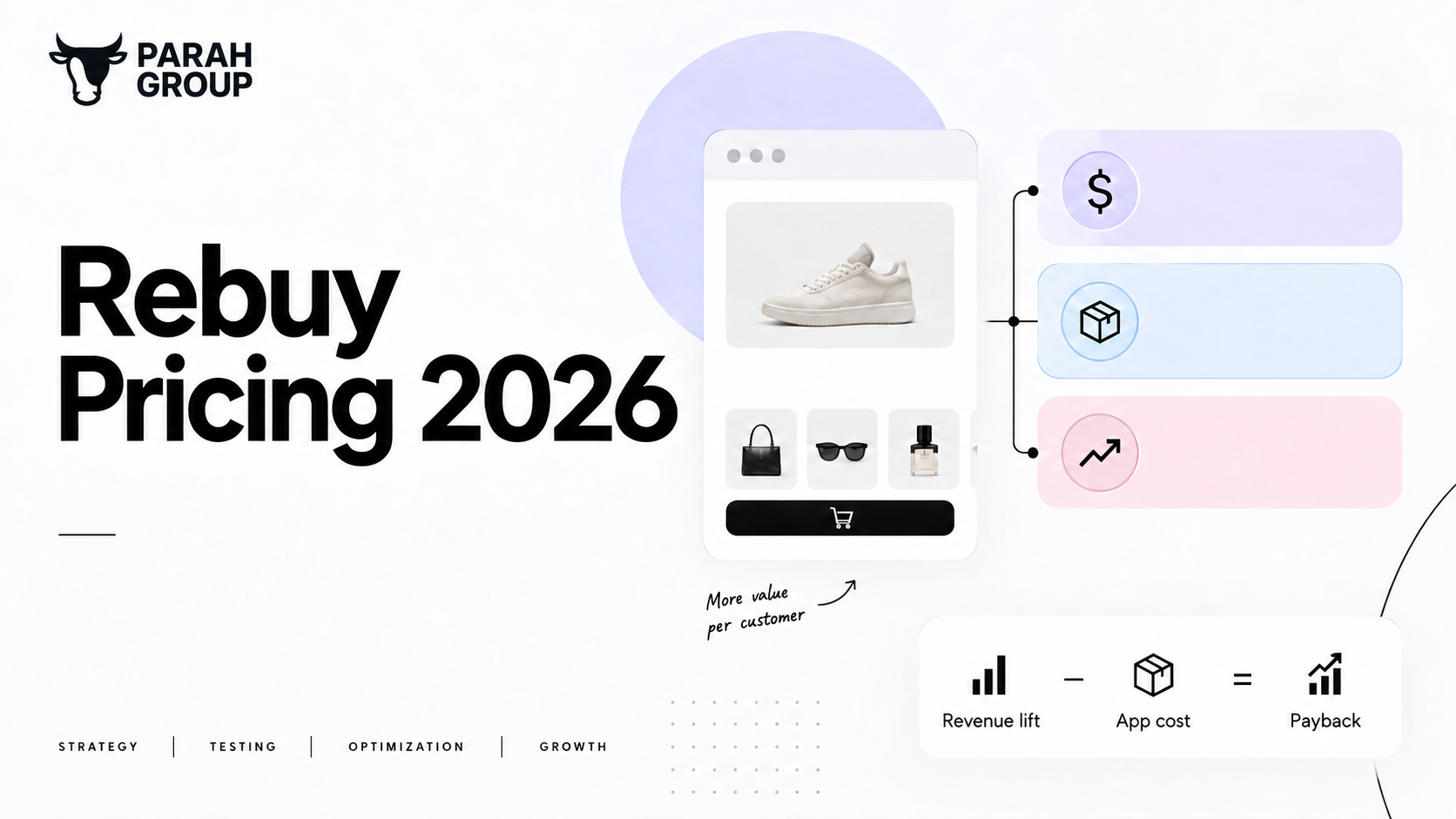
Rebuy pricing is package-based and scales with Shopify order volume. As of September 2026, Cart & Merchandising starts at $45 a month, Checkout & Post-Purchase at $25, Search and Flows at $35 each, all at 500 orders. A 3,000-order store pays about $362 a month for cart plus post-purchase, and breaks even at $0.30 of added revenue per order.
That is the summary. Below is how each tier is priced, what is inside each package, a worked payback calculation you can rerun with your own numbers, and where a cheaper app is the better choice.
How is Rebuy priced in 2026?
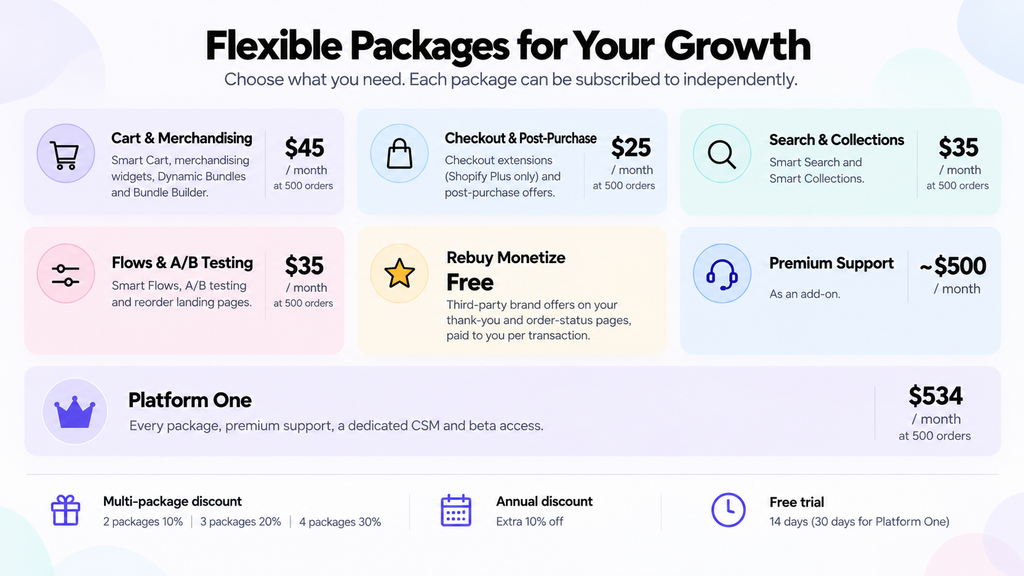
Rebuy moved from a single tiered plan to four packages you can buy separately. Per Rebuy’s pricing page, “each package can be subscribed to independently” and no base plan is required (Rebuy pricing). The price of each package depends on one input: how many orders a month your Shopify store averages. The pricing page has a selector for that number, and the price of every package moves with it.
At the default 500 orders a month, the published monthly prices are:
- Cart & Merchandising: $45. Smart Cart, merchandising widgets, Dynamic Bundles and Bundle Builder.
- Checkout & Post-Purchase: $25. Checkout extensions (Shopify Plus only) and post-purchase offers.
- Search & Collections: $35. Smart Search and Smart Collections.
- Flows & A/B Testing: $35. Smart Flows, A/B testing and reorder landing pages.
- Rebuy Monetize: free. Third-party brand offers on your thank-you and order-status pages, paid to you per transaction.
- Premium Support: about $500 a month as an add-on.
- Platform One: every package plus premium support, a dedicated CSM and beta access, shown from $534 a month at the default tier and “talk to sales” above it.
Three modifiers apply. Buying more than one package discounts each: the pricing calculator shows two packages at 10 percent off, three at 20 percent and four at 30 percent. Annual contracts take a further 10 percent off the monthly rate. And every paid package carries a 14-day free trial, with Platform One quoted at 30 days. Rebuy’s pricing page also states a positive ROI guarantee, comparing “the amount spent on the Rebuy platform” with “the additional revenue driven by Rebuy”, with refund requests due within 60 days of the Shopify invoice.
One thing to know before you install. As of mid-September 2026, Rebuy’s Shopify App Store listing at apps.shopify.com/rebuy reads “This app is not currently available on the Shopify App Store” and directs merchants to contact Rebuy directly. Pricing and installation therefore run through rebuyengine.com, not the App Store.
How does Rebuy pricing scale with order volume?
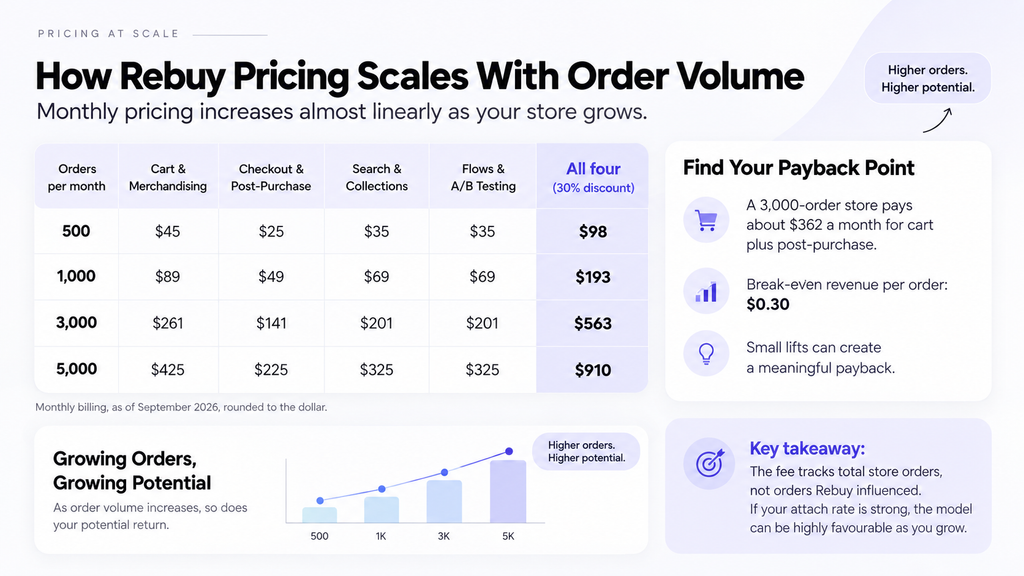
This is the part most comparisons skip, and it is the part that decides whether Rebuy is affordable. The pricing page prices by orders per month, and the increase is close to linear. Using the same calculator that powers the pricing page, single-package monthly prices at four volumes are:
| Orders per month | Cart & Merchandising | Checkout & Post-Purchase | Search & Collections | Flows & A/B Testing | All four (30% multi-package discount) |
|---|---|---|---|---|---|
| 500 | $45 | $25 | $35 | $35 | $98 |
| 1,000 | $89 | $49 | $69 | $69 | $193 |
| 3,000 | $261 | $141 | $201 | $201 | $563 |
| 5,000 | $425 | $225 | $325 | $325 | $910 |
Monthly billing, as of September 2026, rounded to the dollar. Above 50,000 orders the page switches to “talk to sales”. The important point is that the fee tracks total store orders, not orders Rebuy influenced, and not Rebuy-generated revenue. That differs from Zipify OCU, which scales with upsell revenue, and from ReConvert, which caps by both orders and upsell revenue. If your store does high volume with a low attach rate on recommendations, Rebuy’s basis is the least favourable of the three. If your attach rate is strong, it is the most favourable, because the fee does not rise with your success.
Rebuy does track Rebuy-Generated Revenue (RGR), which the pricing page defines as revenue “driven directly by a Rebuy widget, link, search, or recommendation workflow”. RGR is the number the ROI guarantee is judged on, and it is the number you should be watching monthly. If RGR is not several multiples of the fee after ninety days, the configuration is wrong, not the tool.
What do you get in each Rebuy package?
Cart & Merchandising is the package most stores buy first. Smart Cart is a slide-out cart drawer with a tiered progress bar, a switch-to-subscription toggle, and cross-sell widgets such as Customer Also Bought, Recently Viewed and Frequently Bought Together, per Rebuy’s product page (Rebuy, Cart & Merchandising). The merchandising widgets place the same recommendation engine on the homepage, product pages and collections. Dynamic Bundles builds personalised bundle offers, and Bundle Builder gives you a multi-step bundle page without new SKUs.
Checkout & Post-Purchase covers two placements. Post-purchase offers fire on Shopify’s post-purchase page, between payment and the thank-you page, and Rebuy says you can design up to 40 post-purchase flows tied to customer behaviour (Rebuy, Checkout & Post-Purchase). Checkout extensions add upsells, reviews and trust badges inside checkout itself, and Rebuy marks these as Shopify Plus only. That matches Shopify’s own rule: UI extensions on the information, shipping and payment pages are a Plus feature, while thank-you and order-status page apps are available on Basic and above (Shopify Help Center). If you are not on Plus, this package is a post-purchase package.
Search & Collections replaces Shopify’s default search with Smart Search and adds rule-based merchandising to collection pages. Flows & A/B Testing adds Smart Flows for conditional offer logic, Rebuy’s own split testing, and reorder landing pages. The A/B testing here tests Rebuy widgets against each other. It is not a site-wide testing tool, and for price, shipping-threshold and checkout tests we run Intelligems alongside it.
When does Rebuy pay for itself?
Here is the calculation, stated so you can change the inputs. Assume a Shopify store doing 3,000 orders a month at an AOV of $114.70, which is the average cart Shopify reported across BFCM 2025 (Shopify, BFCM 2025 data). Assume the store buys Cart & Merchandising and Checkout & Post-Purchase on monthly billing.
- Cart & Merchandising at 3,000 orders: $261. Checkout & Post-Purchase: $141. With the two-package discount, $234.90 plus $126.90, or $361.80 a month. Annual billing takes that to about $326.
- Per order, that is $0.12, or 0.1 percent of the $114.70 AOV.
- Rebuy is paid from margin, not revenue. At a 40 percent contribution margin on incremental items, the widgets need to add $904.50 of incremental revenue a month to break even. That is $0.30 per order, or a 0.26 percent lift in AOV.
- At a 30 percent margin the break-even is $0.40 per order. At 50 percent it is $0.24.
Put another way: if one order in every 200 accepts a $60 post-purchase offer, Rebuy has roughly covered its fee at this volume. Everything above that is profit. The bar is low, which is why Rebuy can offer an ROI guarantee. The real question is not whether Rebuy pays back but whether it pays back more than a $35 app would, and that depends on how much of the platform you actually configure and test.
Our own numbers with post-purchase upsells sit well above the break-even. Willie’s, a cannabis DTC brand, ran Rebuy post-purchase alongside Intelligems checkout tests and a gamified cart bar; over three months, while paid traffic scaled, AOV rose 25 percent, conversion rose 20 percent and subscription take rate rose 75 percent. Salt & Stone added over $7,000,000 in additional annual revenue across a programme that included post-purchase upsells. Those results came from testing offers, thresholds and placement week after week, not from installing the app. If you want that programme run on your store, see our Shopify CRO service.
Which Rebuy alternatives fit which store?
Rebuy is the most complete personalisation platform on Shopify, and it is also the most expensive at volume and the most work to configure. Four honest alternatives, with prices verified as of September 2026:
| App | Starting price | Pricing basis | Free tier | Better than Rebuy when |
|---|---|---|---|---|
| AfterSell | $34.99/mo for 0–500 orders; $54.99 for 501–1,000; $99.99 for 1,001–2,000 | Total orders, tiered | Development stores only | You only need post-purchase and thank-you page offers and want a 30-day trial |
| Selleasy | $9/mo up to 500 orders; $19 up to 1,000; $29 for 1,000+ | Total orders, tiered | Free up to 50 orders/mo | You want PDP add-ons and cart upsells under 1,000 orders a month and will write rules by hand |
| ReConvert (Upsell.com) | $4.99/mo up to 50 orders or $50 upsell revenue; $9.99 up to 100; $19.99 up to 200 | Orders or upsell revenue, whichever caps first | Development stores only | You are a small store that wants checkout, post-purchase and thank-you page in one cheap funnel |
| Wiser | Free to 50 orders; $9 for 51–100; $19 for 101–300; $49 for 301–500 | Total orders, tiered | Free up to 50 orders/mo | You mainly want recommendation widgets and a cart drawer, with post-purchase included, at low volume |
The pattern is simple. Under about 1,000 orders a month, a specialist costs a fifth of Rebuy and delivers most of the AOV lift, because the lift comes from a good progress bar and one good post-purchase offer, which every app on the list can place. Above that, Rebuy’s single rules engine across cart, PDP, search and post-purchase starts to earn its fee, particularly for stores with large catalogues where hand-written cross-sell rules break down. Between those points, buy one Rebuy package rather than all four, and add the others only when RGR from the first is proven. That decision framework is the same one we apply inside our CRO Program, where Rebuy is one of the tools we run alongside Intelligems and Shoplift.
What should you do before you sign up?
Three steps. First, pull your trailing 90-day average orders per month from Shopify and set the pricing page to that figure, not to last month. Rebuy prices on the average, and your BFCM month will not be your January. Second, decide which single package to start with. For most DTC stores that is Cart & Merchandising; for a store that already has a good cart drawer from its theme, it is Checkout & Post-Purchase. Third, before the 14-day trial ends, have a baseline: AOV, conversion rate and revenue per visitor for the 30 days before install. Rebuy’s RGR dashboard will tell you what it attributed to itself. Your own baseline tells you whether the store as a whole moved.
If you want us to set that baseline, configure the first package and run the offer tests that decide whether Rebuy stays, book an intro call. We will tell you in the first conversation whether Rebuy or a cheaper app is the right call for your volume, and we do not resell either.
Frequently asked questions
How much does Rebuy cost per month?
As of September 2026, Rebuy sells four packages priced by your monthly Shopify order volume. At 500 orders a month, Cart & Merchandising is $45, Checkout & Post-Purchase is $25, and Search and Flows are $35 each. At 3,000 orders those rise to $261, $141, $201 and $201. Buying multiple packages discounts each, and annual billing takes 10 percent off.
Does Rebuy have a free plan or free trial?
Every paid package includes a 14-day free trial, and Rebuy’s Platform One bundle is quoted with 30 days. The only free product is Rebuy Monetize, which places third-party brand offers on your thank-you and order-status pages and pays you per transaction. There is no free tier for Smart Cart, widgets or post-purchase offers on your own products.
Is Rebuy pricing based on revenue or orders?
Orders. The pricing page asks for your average monthly Shopify orders and prices every package from that figure, regardless of how much revenue Rebuy generates. Rebuy tracks Rebuy-Generated Revenue separately for reporting and for its ROI guarantee, but RGR does not change your bill. Zipify OCU, by contrast, scales its fee with upsell revenue.
Do I need Shopify Plus to use Rebuy?
No. Smart Cart, merchandising widgets, search, bundles and post-purchase offers work on standard Shopify plans. Only the checkout extensions inside the Checkout & Post-Purchase package require Shopify Plus, because Shopify restricts apps on the information, shipping and payment pages to Plus stores. Thank-you and order-status page offers are available on Basic and above.
Is Rebuy worth it for a small Shopify store?
Usually not under about 500 orders a month. Selleasy is free to 50 orders and $9 to 500; Wiser is free to 50; ReConvert starts at $4.99. Those place the same progress bar and post-purchase offer that generate most of the lift. Rebuy earns its fee when catalogue size and volume make hand-written cross-sell rules unmanageable.
What does Rebuy’s ROI guarantee actually cover?
Rebuy’s pricing page says it guarantees a positive ROI for all customers, calculated by comparing the amount spent on the Rebuy platform to the additional revenue Rebuy drove. Refund requests must be made within 60 days of billing on your Shopify invoice. Note that the comparison is against revenue, not margin, so a positive ROI by Rebuy’s definition can still be a loss for you.