TikTok Spark Ads are paid ads that run from a real organic TikTok post, yours or a creator’s, instead of an uploaded video file. The creator generates a code in the app, you paste it into Ads Manager, and the ad keeps the post’s handle, likes and comments. Media costs the same as any in-feed ad; the creator’s usage rights are extra.
The rest of this guide is the operator’s decision: how the code flow works, when Spark beats a standard in-feed ad, what creators charge for usage rights as of October 2026, how we sequence a four-week launch, and where the CTA should send people. We run paid social + CRO programs for DTC brands, so the landing page gets as much attention here as the ad.
What are Spark Ads on TikTok and how are they different from a normal ad?
TikTok’s own definition, from its Business Help Center (last updated June 2026), calls Spark Ads “a native ad format” built on organic TikTok posts and their features. The key word is organic. A standard in-feed ad is a video file you upload. It appears under your advertiser identity, and when it stops running, every like and comment it earned disappears with it. A Spark Ad is a boosted version of a post that already exists on TikTok. The likes, comments, shares and follows it earns while paid are credited back to the original organic post and stay there after the campaign ends.
Two things follow. First, the ad looks like what people came to TikTok to watch. The profile photo, nickname and caption are the creator’s; tapping the handle goes to their profile, the “+” follows them, the sound goes to the music page. Second, you give up control. TikTok’s help page is explicit: the display name and caption “reflect the chosen organic post and can’t be edited in Ads Manager.” If the caption has a typo, that is what runs.
Spark Ads run from two sources: your own brand account’s posts, which need no code once the account is linked, or a creator’s post, which needs their authorization. The format supports every auction objective a DTC brand uses, including Traffic, Conversions, Lead generation and Sales. Maximum video length is 10 minutes, and an Ads Manager account can hold up to 10,000 Spark Ads. If you are still deciding whether TikTok belongs in the mix, our TikTok ads vs Facebook ads comparison covers that. This post assumes you are already in.
How does the TikTok Spark Ads code and authorization flow work?
The code flow is where most first campaigns stall, because the brand waits on a creator who has never done it. The sequence, as TikTok documents it (Help Center, last updated October 2025):
On the creator’s side, in the TikTok app:
- Confirm authorized posts are allowed under Settings and Privacy > Privacy, or Me > Creator tools.
- Open the video, tap the three dots, then tap Ad settings.
- Agree to the advertising content terms and turn on the Ad authorization toggle.
- Choose an authorization period: 7, 30, 60 or 365 days.
- Tap Generate, then Copy Code, and send the code to the advertiser.
On the advertiser’s side, in TikTok Ads Manager:
- Go to Tools > Creative > Creative library > Spark ads posts.
- Click Apply for Authorization, paste the code into the search bar and click Search.
- Review the post and click Confirm. You can batch up to 20 codes at a time.
- Build the ad. In the creative drawer, choose the post from the TikTok Post tab (pull) and submit.
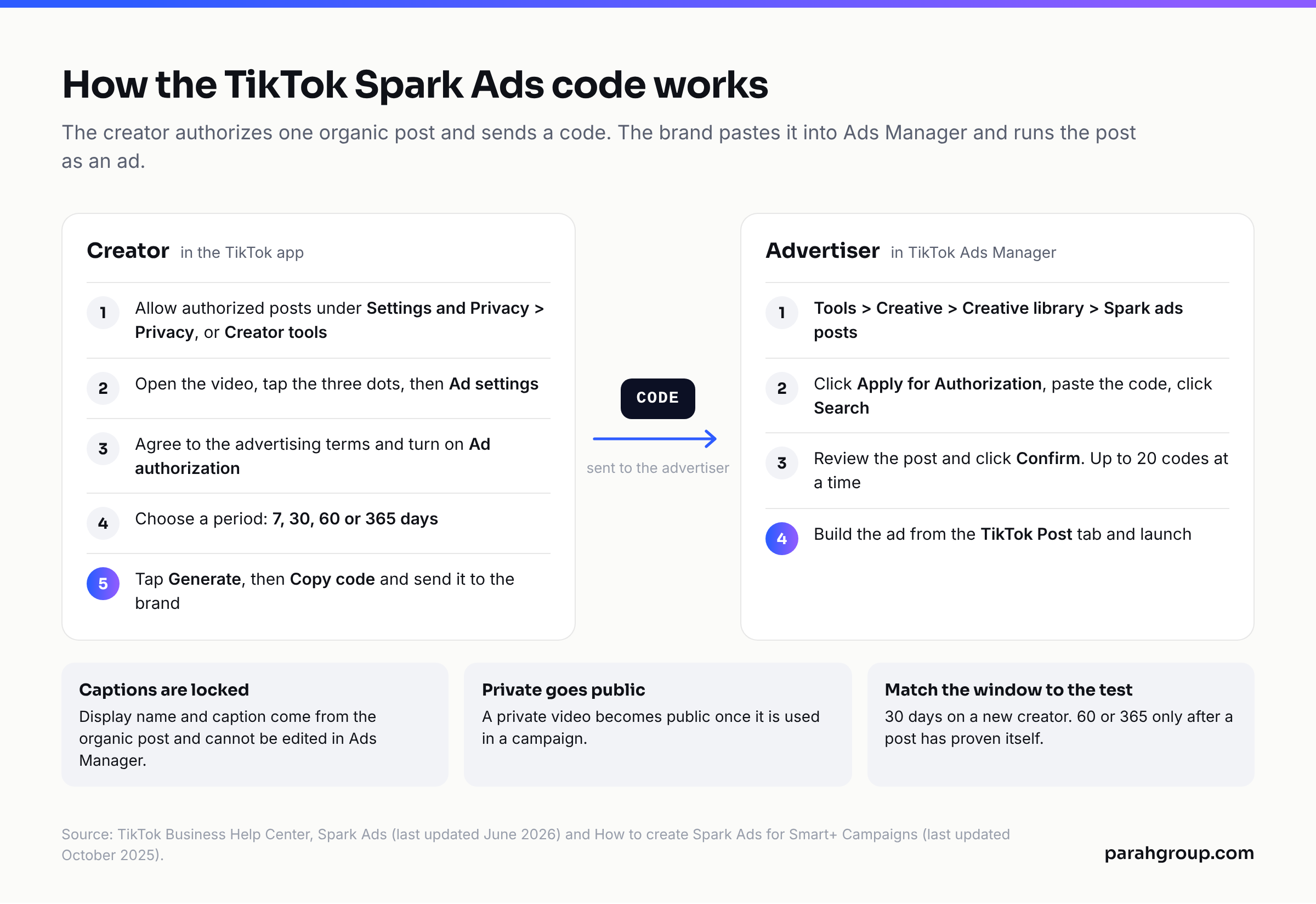
Three notes from TikTok’s fine print that brands learn the hard way. Captions cannot be edited after authorization, so review the caption before you ask for the code. A private video becomes public once used in a campaign. And a video must be un-authorized as a Spark Ad before it can be deleted from the organic account, which matters if a creator wants to pull a post mid-flight.
There is also a second route called push: upload the video in Ads Manager, connect a TikTok account, and TikTok posts it privately to that account after ad review. We use push for brand-account UGC we bought outright and pull for creator posts where the creator’s handle is the point. Match the authorization window to the test: 30 days on a new creator, 60 or 365 only after a post has proven itself.
Spark Ads vs standard in-feed ads: which should you run?
Neither format wins every time. The table below is how we decide, ad by ad, inside the same ad group. TikTok allows Spark and non-Spark ads to sit together in one ad group with creatives from multiple identities, so the choice is never campaign-wide. The rows that matter most for a DTC buyer are control, iteration speed and where the taps go, because those decide how fast you can test and how much of the click you keep.
| Factor | Spark Ads | Standard in-feed ads |
|---|---|---|
| Identity shown | Creator’s or brand’s real handle, photo and caption | Advertiser identity set in Ads Manager |
| Control over caption and name | None after authorization | Full, editable any time |
| Social proof | Existing likes, comments and shares show; paid engagement stays on the post | Starts at zero; engagement is lost when the ad stops |
| Iteration speed | Slower: a new cut needs a new post and a new code | Fast: upload a new file, duplicate the ad |
| Where taps go | CTA and caption go to your landing page; handle, “+” and sound go to the creator’s profile and music page | CTA, profile photo, nickname, caption and swipe-left all go to your landing page |
| Paid clicks counted | CTA button and ad caption only | CTA, caption, nickname, profile picture and swipe-left |
| Media cost | Same auction CPM; TikTok’s own comparison shows CPM 4% lower | Same auction CPM |
| Creative cost | Content fee plus usage rights, typically +20% to +50% of the base rate | Content fee only, or in-house production |
| Creator or video rights needed | Yes, time-bound code (7, 30, 60 or 365 days) | Perpetual rights to the file you upload |
| Best for | Prospecting, creator-led offers, posts that already have organic traction | Rapid hook testing, retargeting, promo-driven ads with hard dates |
The practical rule we run: Spark for the top of the funnel, where a creator’s face and comment section do the persuading, and standard in-feed for anything that needs ten variations by Friday or a caption that changes with the offer. The one trap in the Spark column is leakage. Every tap on the creator’s handle, “+” or sound is a tap that did not reach your page. Tolerable on a prospecting ad with a strong CTA; a waste on a retargeting ad whose only job is to get a warm visitor back to checkout.
What does TikTok say Spark Ads do for performance?
Treat every platform claim as the platform’s claim. With that caveat, TikTok’s Spark Ads Creative Playbook (Creative Center) publishes one head-to-head comparison, labelled “Spark Ads performance comparison with Diversion In-Feed Ads, Q4 2020-Q2 2021, TikTok Internal Data.” Against non-Spark ads it reports completion rate +30%, engagement rate +142%, conversion rate +43% and CPM 4% lower. The data is five years old and TikTok has not republished a newer version of the comparison, so we read it as direction, not magnitude.
The more useful material in the same playbook is from a 2023 analysis of the top 200 highest-spending Spark Ads. 87% of them involved creators rather than brand-account posts. Creator Spark Ads beat non-creator Spark Ads on ARPM, CTR, view-through rate and engagement. Spark Ads that used Stitch held viewers 70% longer. Videos longer than 38 seconds outperformed shorter ones, which runs against the six-second hook advice most agencies give.
Two findings from TikTok’s Marketing Science studies translate directly into briefs. Speaking straight to camera raised “hooking power” by 50% (How to Hook Study, 2023). Showing the product lifted ad recall 138%, while showing a person lifted purchase intent 72% (Elements of Attention Study, 2022). So the brief says: creator on camera, talking, with the product in hand and visible more than once.
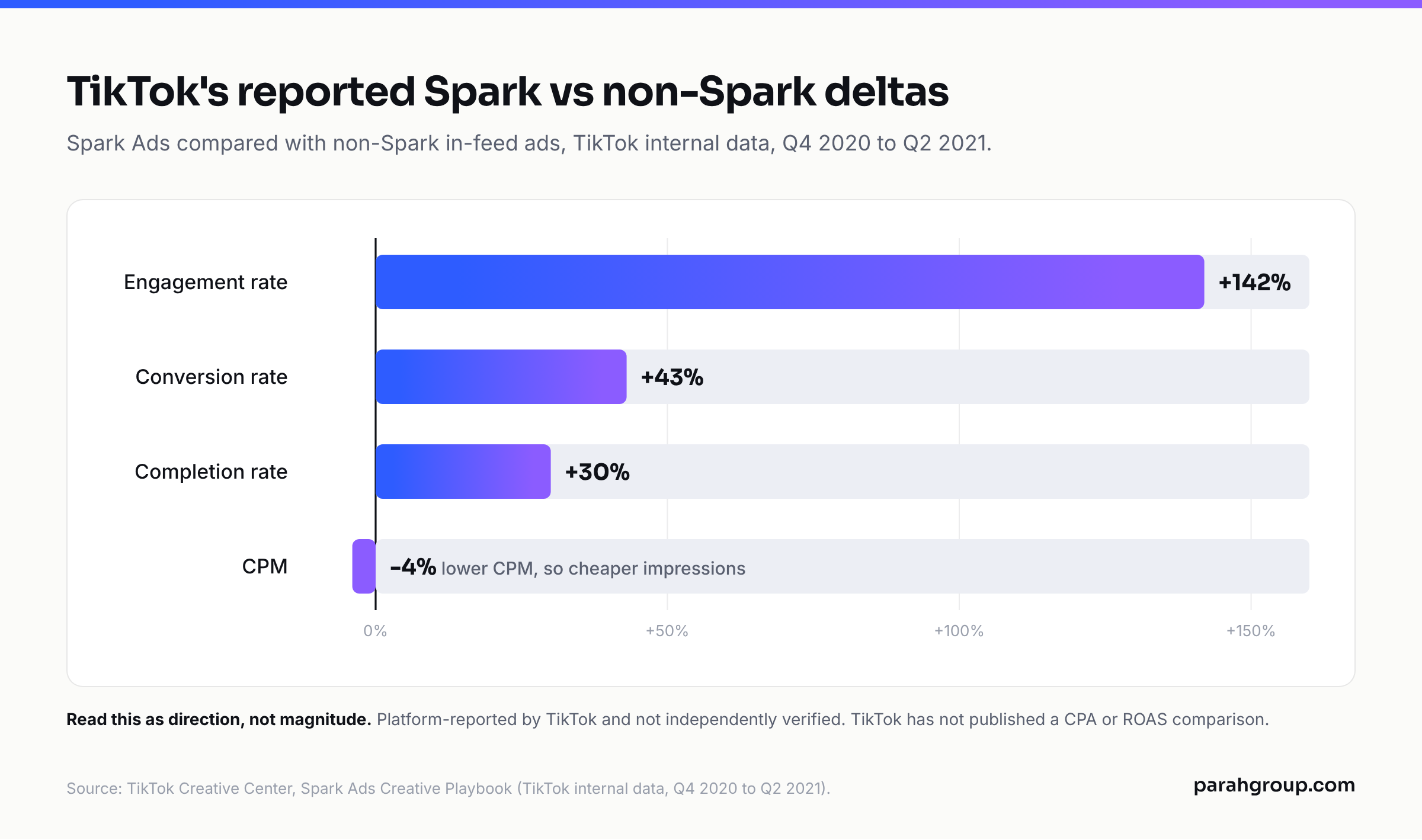
What TikTok does not publish is a CPA or ROAS comparison, the number a DTC operator actually buys on. In our accounts the Spark advantage shows up in CTR and cost per landing page view; whether it becomes a lower CPA depends on the page the click lands on.
What do TikTok Spark Ads cost, including creator usage rights?
There are two bills. The media bill is the same TikTok auction you pay for any in-feed ad; minimums, CPM ranges and budgeting are covered in our post on TikTok ads cost. The second bill is the creator’s: the content fee plus the usage rights to run it as a Spark Ad. Third-party rate cards as of October 2026 agree on the shape and vary on the numbers:
- Influee (April 2026): per-video content fees of $25 to $200 for nano creators (1K to 10K followers), $200 to $1,500 for micro (10K to 100K), $1,500 to $5,000 for macro (100K to 1M). Spark Ads “add 20-50% to the base content rate,” priced as a separate line item from general usage rights.
- LaunchPoint (March 2026, e-commerce creators): $200 to $800 per native video at 10K to 50K followers, $800 to $2,500 at 50K to 250K. Spark Ad whitelisting is listed as a 30-day add-on at $300 to $1,000, and paid-ad usage premiums run “30% to 100%” of base rate.
- Influencer Marketing Hub’s Spark Ads addendum template (June 2025): a minimum of 150 per code per 30-day window plus 25% of the original content fee, with prepay discounts of 10% for 90 days, 20% for 180 and 30% for 365.
How we price it on the brand side: budget 25% to 35% of the content fee per 30-day Spark window for micro creators, and expect macro creators to push for the top of the range or a flat fee. Negotiate rights by duration, not by spend. A creator who ties the fee to your ad spend has turned a licence into a revenue share. Pay for 30 days first, buy 365 only on the posts that earn it, and put the code regeneration clause in the contract from day one.
If you want a second set of eyes on your creator spend before you sign the next batch of briefs, our TikTok ads agency team will review the account and the rate cards for free.
How do you launch Spark Ads in four weeks alongside in-feed ads?
This is the plan we run on a TikTok account that already has in-house or bought UGC and wants to add creators.
Week 1: codes and controls. Brief four to six micro creators with one offer and one landing page. Ask for 30-day codes. In parallel, cut three to four standard in-feed ads from existing UGC with the same offer. Launch one Conversions ad group with the in-feed ads only, optimising to purchase (or lead, for lead gen), so you have a control running while codes come in.
Week 2: Spark goes live. Authorize every code the day it arrives and add the Spark posts to the same ad group as the in-feed controls. Same audience, same budget. Pull nothing before 7 days unless a post has zero add-to-carts at 2x target CPA. Watch cost per landing page view and the Spark-only metrics: paid profile visits and anchor click rate tell you how much is leaking to the creator’s profile.
Week 3: cut and recut. Pause the bottom half of both formats on cost per purchase. For winning Spark posts, ask the creator for a second cut and a new code; for winning in-feed ads, cut three new hooks on the same body. Open a retargeting ad group on in-feed ads only, with a tighter caption and a direct CTA.
Week 4: scale and extend. Move the two or three best Spark posts into a Smart+ campaign if your account has it, and push their creators for 60- or 365-day codes at the negotiated rate. Set the next creator batch from what won: same angle, same length band, same on-camera style.
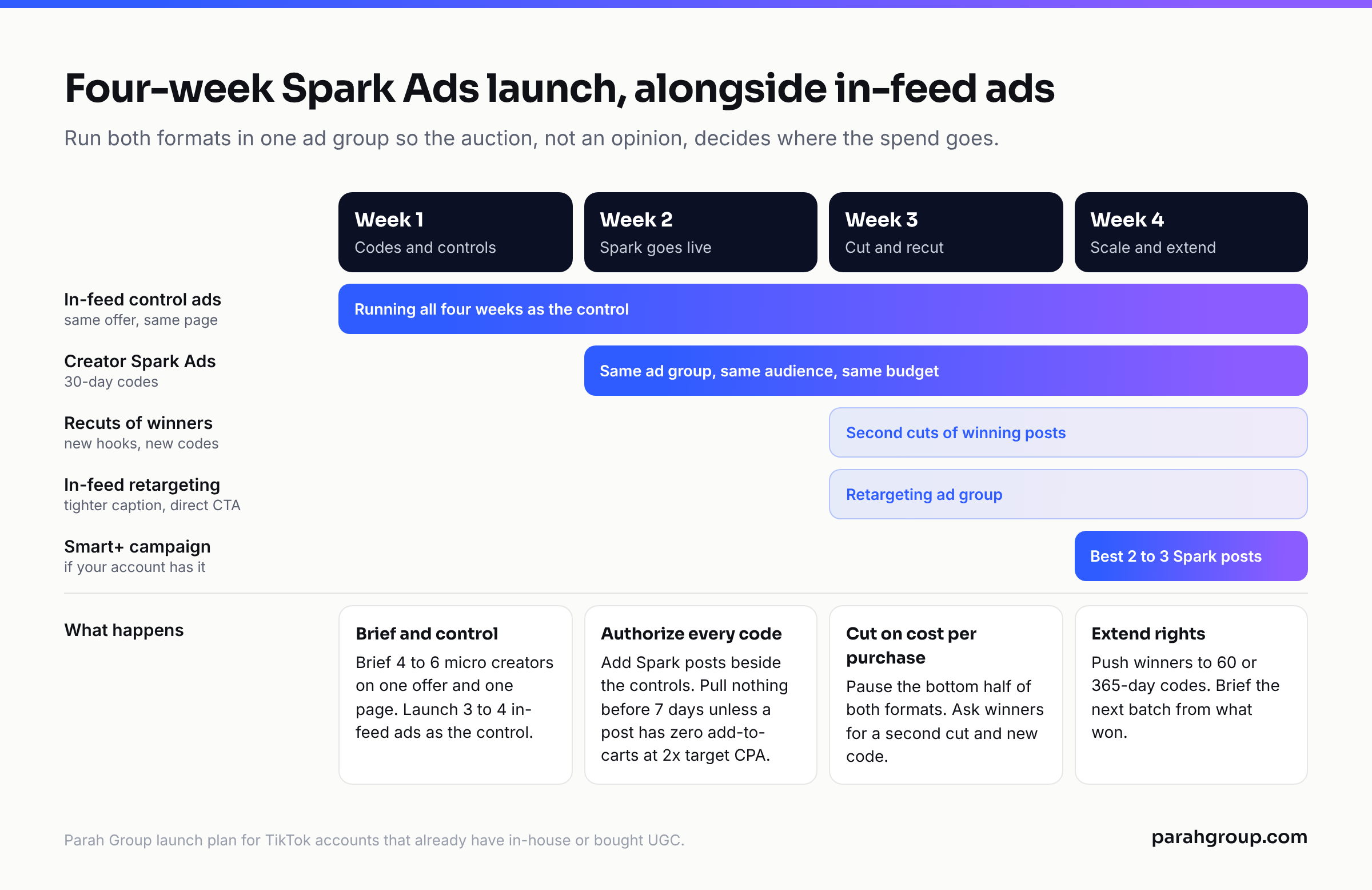
Running both formats in one ad group means the auction, not an opinion, decides where the spend goes. By the end of week four you know whether creator Spark posts beat your in-feed cuts on cost per purchase, with the same audience and page.
Where should the Spark Ad CTA send people?
Everything above is wasted if the CTA lands on a standard product page. A Spark Ad sets up a specific promise, in a specific creator’s words, and the visitor arrives expecting it to continue. A homepage or generic PDP breaks it in the first second. That gap between the ad and the page is where most TikTok accounts lose their CPA, and it is why we run the page and the ad as one program.
What a Spark landing page needs, in order: the same offer the creator stated, above the fold, with the creator’s name or face if the rights cover it; one product or bundle, not a catalogue; reviews and UGC over spec sheets; and a single path to checkout. Keep the price visible. On mobile, which is all of TikTok, the first scroll confirms the ad and the second shows the button.
We built this for STRNG Seeds, a cannabis DTC brand. Custom landing pages for paid traffic, multi-packs on the product pages, a free gift above a cart threshold and post-purchase upsells took revenue per visitor up 90% in six months. The ads did not change much over that period. The pages did, and every paid click, Spark or in-feed, was worth 90% more because of it. That is the lever most TikTok programs leave untouched because the agency running the ads does not own the page.
Build one page per offer, not per creator, and test it in the same weekly cycle as the ads. Our landing pages for paid traffic service exists for this: pages tested with Intelligems or VWO and reported with the ads in the same weekly CAC review.
The decision, then: run Spark for creator-led prospecting, keep in-feed for speed and retargeting, buy rights by the month, and fix the page before you scale either. If you want us to look at your TikTok account and the pages it lands on, get a free, no-obligation audit of your ad accounts.
FAQs
What are Spark Ads on TikTok?
Spark Ads are TikTok’s native ad format that promotes an existing organic post, from your account or a creator’s, as a paid ad. The ad keeps the post’s handle, caption, likes and comments, and any engagement it earns while paid is credited to the original post. TikTok’s Help Center describes them as a native format built on organic posts and their features.
How do I get a TikTok Spark Ads code?
The creator opens the video in the TikTok app, taps the three dots, then Ad settings, agrees to the advertising terms, turns on Ad authorization, picks a period of 7, 30, 60 or 365 days, and taps Generate then Copy Code. The advertiser pastes that code under Tools > Creative library > Spark ads posts > Apply for Authorization in Ads Manager and confirms the post.
Do Spark Ads cost more than regular TikTok ads?
The media cost is the same auction CPM as any in-feed ad. The extra cost is the creator’s usage rights. Third-party rate cards as of October 2026 put Spark authorization at roughly 20% to 50% on top of the content fee, or $300 to $1,000 as a flat 30-day add-on for e-commerce creators, priced by licence duration rather than ad spend.
Can Spark Ads and in-feed ads run in the same ad group?
Yes. TikTok allows Spark and non-Spark ads in one ad group, with creatives from multiple identities. We run them together on purpose, with the same audience, budget and landing page, so the auction decides which format gets the spend and the comparison on cost per purchase is clean.
Can I edit the caption on a Spark Ad?
No. Once a post is authorized, the display name and caption come from the organic post and cannot be edited in Ads Manager. Review the caption and hashtags before you ask for the code. If a change is needed, the creator edits or reposts, and you need a new authorization code.
What happens to the likes and comments when a Spark Ad stops?
They stay on the organic post. That is the main structural difference from a standard in-feed ad, where engagement is lost when the ad is paused. TikTok counts paid likes, shares, comments and followers within one day of a user seeing the ad, and reports them as Spark-only metrics in Ads Manager.
Sources
- TikTok Business Help Center: Spark Ads (last updated June 2026)
- TikTok Business Help Center: How to create Spark Ads for Smart+ Campaigns (authorization code steps and periods; last updated October 2025)
- TikTok Creative Center: Spark Ads Creative Playbook (TikTok internal data, Q4 2020 to Q2 2021; Top 200 Spark Ads analysis, 2023)
- Influee: TikTok Influencer Rates 2026 (third-party, April 2026)
- LaunchPoint: How much do e-commerce TikTok creators charge (third-party, updated March 2026)
- Influencer Marketing Hub: Spark Ads and Whitelisting Permission Addendum (third-party template, last updated June 2025)