Upsells inside the Shopify checkout itself, on the information, shipping and payment steps, require Shopify Plus. On every other plan you get the thank-you and order-status pages only. If you are on Plus, run one small order bump under $15 through Rebuy, AfterSell or Zipify OCU and test it with Intelligems. If you are not, put the offer post-purchase and leave checkout alone.
What can you actually change in Shopify checkout on your plan?
Get this right before you install anything. Most of the confusion about a Shopify checkout upsell comes from apps advertising a feature your plan cannot use.
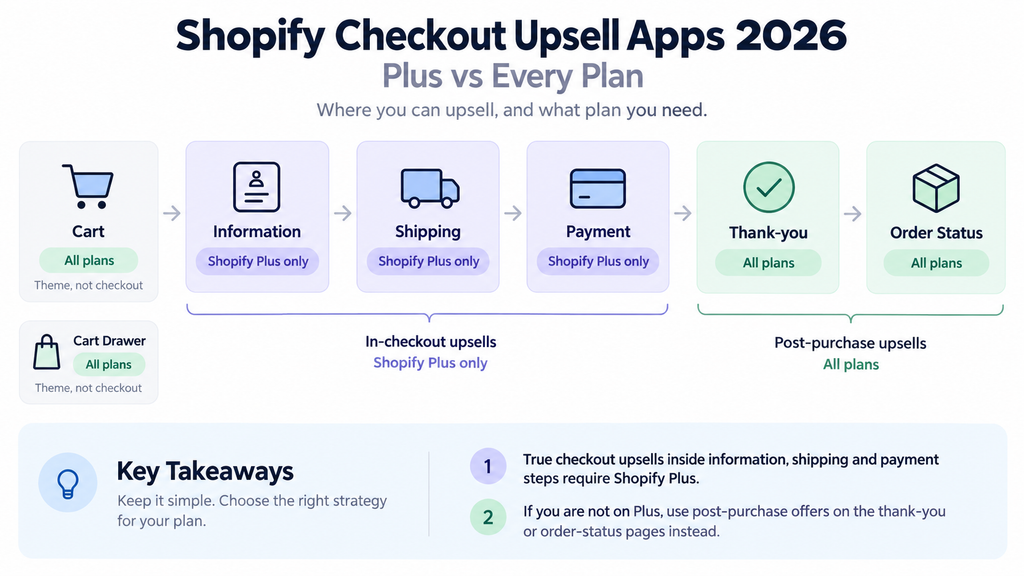
Shopify’s Help Center draws the line in a comparison table. Eligible apps that customise the information, shipping and payment pages are available on Shopify Plus only. Eligible apps that customise the thank-you and order-status pages are available on Basic plan or higher, which means every plan (Shopify Help Center: checkout extensibility). The developer documentation says the same thing in one sentence: “Checkout UI extensions for the information, shipping, and payment steps are available only to stores on a Shopify Plus plan” (shopify.dev: checkout UI extensions).
The old workaround is gone. Script tags and checkout.liquid customisations were sunset on the checkout pages on 28 August 2025 for Plus stores and on 26 August 2026 for non-Plus stores (shopify.dev: build for checkout). As of September 2026 there is no supported way to put an upsell into the checkout steps on a Basic, Shopify or Advanced plan. Any app that claims otherwise is placing the offer on the thank-you page and calling it checkout.
So the honest map is:
- Information, shipping and payment steps: Plus only. This is where a true checkout upsell, order bump, shipping protection toggle or gift-wrap option lives.
- Thank-you page and order-status page: all plans. This is where one-click post-purchase offers, order tracking widgets and “add to your order” prompts live.
- Cart and cart drawer: all plans, theme territory, not checkout. Many “checkout upsell” screenshots in app listings are cart drawer upsells.
This post is about the first bucket. Everything below assumes you are on Plus or deciding whether Plus is worth it for this.
Which Shopify checkout upsell apps offer in-checkout offers?
All pricing and plan claims below are as of September 2026, from each vendor’s Shopify App Store listing or pricing page. Check before you buy.
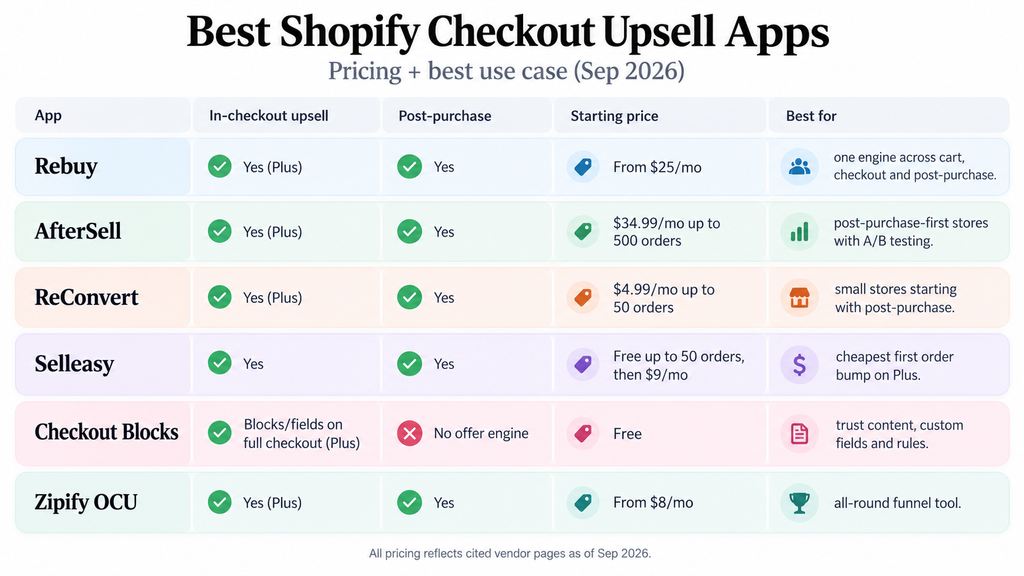
Rebuy sells checkout extensions in its Checkout and Post-Purchase package, described on its pricing page as content blocks and AOV-boosting offers, “Shopify Plus exclusive”. Build Your Own plans start at $25/month and scale with order volume; Platform One, the full suite with a dedicated CSM, starts at $534/month. Post-purchase and thank-you page offers are included (rebuyengine.com/pricing). As of September 2026 the Rebuy App Store listing shows the app as not currently available there, so install goes through Rebuy directly. We run Rebuy for several clients. It is the strongest of the group when you want checkout, post-purchase and cart driven by one recommendation engine.
AfterSell is a post-purchase app first, with “Checkout upsells (Shopify Plus only)” plus reward bars and testimonials in checkout for Plus merchants. Pricing is by order volume: $34.99/month up to 500 orders, $54.99 to 1,000, $99.99 to 2,000, with a 30-day trial. Post-purchase one-click upsell and downsell, thank-you page offers and built-in A/B testing are included (AfterSell on the Shopify App Store). Right when post-purchase is the main event and checkout is secondary.
ReConvert lists “checkout upsell (Shopify Plus only)” alongside one-click post-purchase funnels and thank-you page widgets for order tracking, surveys and discount codes. Upsell Basic is $4.99/month up to 50 orders or $50 upsell revenue, Growth $9.99/month, Business $19.99/month, rising with volume and upsell revenue, with a 14-day trial (ReConvert on the Shopify App Store). Right for small stores that want post-purchase first.
Selleasy by LogBase offers checkout upsells and post-purchase one-click upsells built on Shopify’s checkout extensions, plus cross-sells on the thank-you and order-status pages. Free up to 50 orders a month, then $9/month to 500, $19/month to 1,000, $29/month above that, all with a 30-day trial (Selleasy on the Shopify App Store). Cheapest way for a Plus store to put a first order bump in checkout.
Checkout Blocks is developed by Shopify and is free. It is a building block rather than an offer engine: content blocks, custom fields, delivery and payment method rules, and order or shipping discounts. On all plans it customises the thank-you and order-status pages. Plus merchants can extend the same blocks to the full checkout (Checkout Blocks on the Shopify App Store). Use it for trust content, gift messages and conditional fields, and pair it with an upsell app for offers.
Zipify OneClickUpsell (OCU) lists in-checkout upsells for Plus stores alongside product page, pre-purchase, post-purchase and thank-you page offers. Pricing starts at $8/month and scales with generated upsell revenue, with a 30-day trial (Zipify OCU on the Shopify App Store). A solid all-round funnel tool without Rebuy’s recommendation engine.
| App | In-checkout upsell (Plus) | Post-purchase | Thank-you page | Starting price (Sep 2026) | Best for |
|---|---|---|---|---|---|
| Rebuy | Yes, checkout extensions | Yes | Yes | From $25/mo (Build Your Own); Platform One from $534/mo | Plus brands wanting one engine across cart, checkout and post-purchase |
| AfterSell | Yes, Plus only | Yes, with A/B testing | Yes | $34.99/mo up to 500 orders | Post-purchase-first stores adding a checkout placement |
| ReConvert | Yes, Plus only | Yes | Yes, widgets | $4.99/mo up to 50 orders | Small stores starting with post-purchase |
| Selleasy | Yes, via checkout extensions | Yes | Yes, cross-sells | Free to 50 orders/mo, then $9/mo | Cheapest first order bump on Plus |
| Checkout Blocks (Shopify) | Blocks and fields on full checkout, Plus | No offer engine | Yes, all plans | Free | Trust content, custom fields, conditional rules |
| Zipify OCU | Yes, Plus | Yes | Yes | From $8/mo, scales with upsell revenue | All-round funnel without a recommendation engine |
What converts inside checkout, and what hurts it?
Checkout is the one place where the visitor has already decided. Do not undo that. Offers that work in checkout are small, obvious and need no thinking.
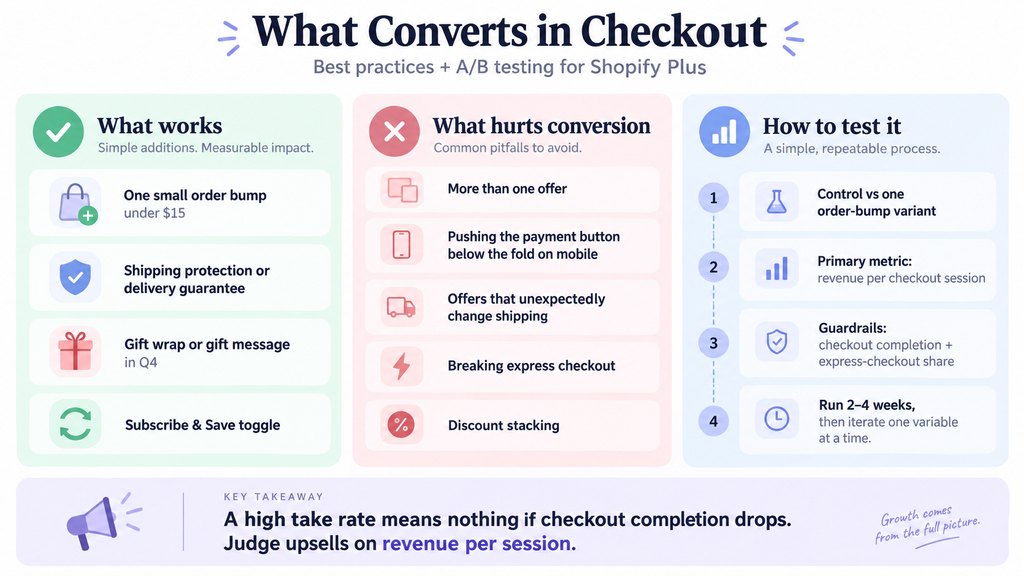
- Order bumps under $15. A single tick-box item related to what is in the cart: a travel size, a refill, a case, a second flavour. Priced low enough that the shopper does not re-evaluate the purchase. One item, one checkbox, one line of copy.
- Shipping protection or a delivery guarantee. A low-priced opt-in that answers the anxiety the shopper has at exactly this step. Opt-out defaults raise take rate and complaints together, so test them.
- Gift wrap or a gift message in Q4. Cheap to fulfil, high margin, and it removes a reason to abandon for a gift buyer.
- Subscription switch. “Subscribe and save 15% on this order” as a toggle on the line item. For Willie’s, a cannabis DTC brand, Intelligems checkout tests alongside Rebuy post-purchase and a gamified cart bar lifted subscription take rate 75%, AOV 25% and conversion 20% in three months while paid traffic scaled. The subscription offer in checkout was the biggest single contributor to take rate.
What hurts is just as consistent:
- More than one offer. Two bumps convert worse than one, and three convert worse than none.
- Anything that pushes the payment button below the fold on mobile. Adobe reported 57.5% of Cyber Monday 2025 online sales came from mobile (Adobe, 2 Dec 2025). Measure your offer block height on a 390-pixel-wide screen.
- Offers that change the total unexpectedly, such as a bump that adds weight and raises the shipping rate.
- Breaking express checkout. Shopify reported that 32% of BFCM 2025 orders were placed with Shop Pay (Shopify, 2 Dec 2025). A shopper who taps Shop Pay from the cart skips the information step and may never see your offer. That is fine. Do not hide express buttons or force the long path to show an upsell. You will lose more from the third of buyers who wanted the fast lane than you gain from the bump.
- Discount stacking. A bump at a promo price that combines with a sitewide code can go negative margin. QA every combination.
Baymard’s running average of documented cart abandonment studies is about 70% (Baymard Institute). Checkout is already leaky. Every element you add has to earn its place on revenue per session, not take rate.
If you want a second pair of eyes on your checkout before you add anything, our Shopify CRO program starts with a checkout and cart audit.
How do you A/B test a checkout upsell with Intelligems?
Take rate is not the metric. A bump with a 20% take rate that drops checkout completion 3% loses money on most stores. You need a split test that reads revenue per session across the whole checkout, which means a tool that can vary what checkout shows per visitor.
Intelligems does this, with two requirements. Its documentation states that “Checkout Personalizations and Checkout Testing is only available for Shopify Plus merchants” (Intelligems docs). Second, checkout testing is a module on your Intelligems plan. As of September 2026 the Unlimited plan, listed at $2,894/month or $1,279/month on a three-month minimum, includes all modules including Smart Checkout and Smart Post-Purchase; on the build-your-own plan the checkout module is added separately and its price is not published (intelligems.io/pricing).
What you can test, per the same documentation: Intelligems’ own checkout blocks including upsells, trust badges, callouts, timers and progress bars; Shopify Checkout Blocks with conditional rules; shipping rates and thresholds; and product prices. Third-party apps can be tested only if they read Intelligems’ cart attributes to show or hide content. You cannot test checkout structure: one-page versus three-page, or step order.
A clean checkout upsell test looks like this:
- Control: checkout as it is. Variant: one order bump, one product, one price, above the payment button.
- Primary metric: revenue per checkout session. Guardrails: checkout completion rate and express-checkout share.
- Run until you can separate a 2% to 3% difference in completion, usually two to four weeks. Do not call it on day five because take rate looks good.
- If revenue per session wins and completion holds, roll out. Then test the next variable: bump price, product, position, copy. One at a time.
For Combat Iron Apparel we ran post-purchase upsells and offer changes inside a wider program, alongside a homepage rebuilt around social proof, fewer pop-ups and a gamified free-shipping bar, and conversion rate rose 35% in six months. Offers were tested one at a time with completion rate as a guardrail, which is why the conversion lift and the AOV lift arrived together instead of trading off. That is what we mean by A/B testing as a program rather than a feature you switch on in an app.
Is Shopify Plus worth it just for checkout upsells?
Usually not on its own. Suppose a store does 5,000 orders a month. An order bump taking at 8% with a $12 average is 400 bumps and $4,800 a month, before margin and before any completion-rate cost. If Plus costs a few thousand dollars a month more than your current plan, the bump alone roughly pays for it and no more. The case for Plus is the whole checkout: B2B, Shopify Functions for discounts and shipping, checkout branding, and the ability to test any of it. Checkout upsells are one line in that case.
If you are staying on a standard plan, put the energy where the platform lets you. Post-purchase one-click offers on the thank-you page work on every plan and carry no completion-rate risk because the order is already paid. For Optimize Minerals, a supplements brand, post-purchase upsells added about 10% to AOV alongside a subscription program that took take rate from 25% to 55 to 60% in six months. None of that needed Plus. Cart drawer offers, free-shipping bars and product page subscription toggles are standard-plan levers too.
So confirm your plan. If you are not on Plus, stop reading app listings that say “checkout upsell” and build post-purchase instead. If you are on Plus with no offer in checkout, that is the gap to close first: Selleasy or Checkout Blocks if you want it cheap, Rebuy if you want it connected to post-purchase and cart. Launch a single order bump under $15 above the payment button, leave express checkout untouched, and test it on revenue per session with completion as the guardrail. Then iterate weekly on price, product and position.
If you would rather have us design, build, QA and test that for you, book an intro call. We will audit your checkout and post-purchase flow, tell you which apps to keep, and show you the first three tests we would run. Book an intro call.
Frequently asked questions
Can I add upsells to Shopify checkout without Shopify Plus?
Not on the information, shipping or payment steps. As of September 2026 Shopify’s documentation restricts checkout UI extensions on those steps to Plus stores, and script-based workarounds were sunset for non-Plus stores on 26 August 2026. On every plan you can add one-click upsells and offers to the thank-you page and order-status page, and to the cart drawer through your theme.
What is the difference between a checkout upsell and a post-purchase upsell?
A checkout upsell appears before payment, inside the checkout steps, and changes the order total before the customer pays. A post-purchase upsell appears after payment on the thank-you page and is accepted with one click using the payment already on file. Post-purchase carries no risk to checkout completion, which is why we usually build it first.
Which Shopify checkout upsell app is cheapest?
As of September 2026, Selleasy is free up to 50 orders a month and $9/month up to 500, and Checkout Blocks by Shopify is free but provides blocks and fields rather than an offer engine. ReConvert starts at $4.99/month and Zipify OCU at $8/month scaling with upsell revenue. All in-checkout placements still require Shopify Plus.
Does a checkout upsell hurt conversion rate?
It can. Anything added to checkout competes with the payment button. Offers that push the button below the fold on mobile, change the total unexpectedly, or stack into multiple prompts tend to lower completion. The fix is one small bump, above the button, tested with checkout completion rate as a guardrail alongside revenue per session.
Can I A/B test checkout upsells with Intelligems on a standard Shopify plan?
No. Intelligems’ documentation states checkout testing and personalisation are available only for Shopify Plus merchants, and the checkout module must be on your Intelligems plan, either through the Unlimited plan or as an add-on to a build-your-own plan. On a standard plan you can still test cart, product page and post-purchase offers.
Should I hide Shop Pay so more shoppers see my checkout upsell?
No. Shopify reported 32% of BFCM 2025 orders used Shop Pay. Forcing those buyers through the long checkout to show them an order bump risks losing a fast, high-intent purchase to gain a small add-on. Leave express checkout alone and put the offer where express buyers will still see it, on the thank-you page.