Facebook ads for Shopify work when three things are set up in the right order: the data layer (Meta Pixel plus Conversions API through the Facebook & Instagram channel), a synced catalog, and a product page that converts the click. Most stores get the campaign settings right and still lose on the page. Fix the page first, then scale spend.
This is the operator version of the setup. It skips the “click Create Campaign” screenshots that Shopify Help and Meta already publish, and covers the decisions a DTC owner actually has to make: which integration to use, how much to spend at each stage, which creative formats pull for product pages, and which page-side levers move cost per acquisition more than any bidding change. Facts about the Shopify and Meta setup are as of October 2026 and sourced at the end.
Should you use the Facebook & Instagram channel or install the Pixel and Conversions API manually?
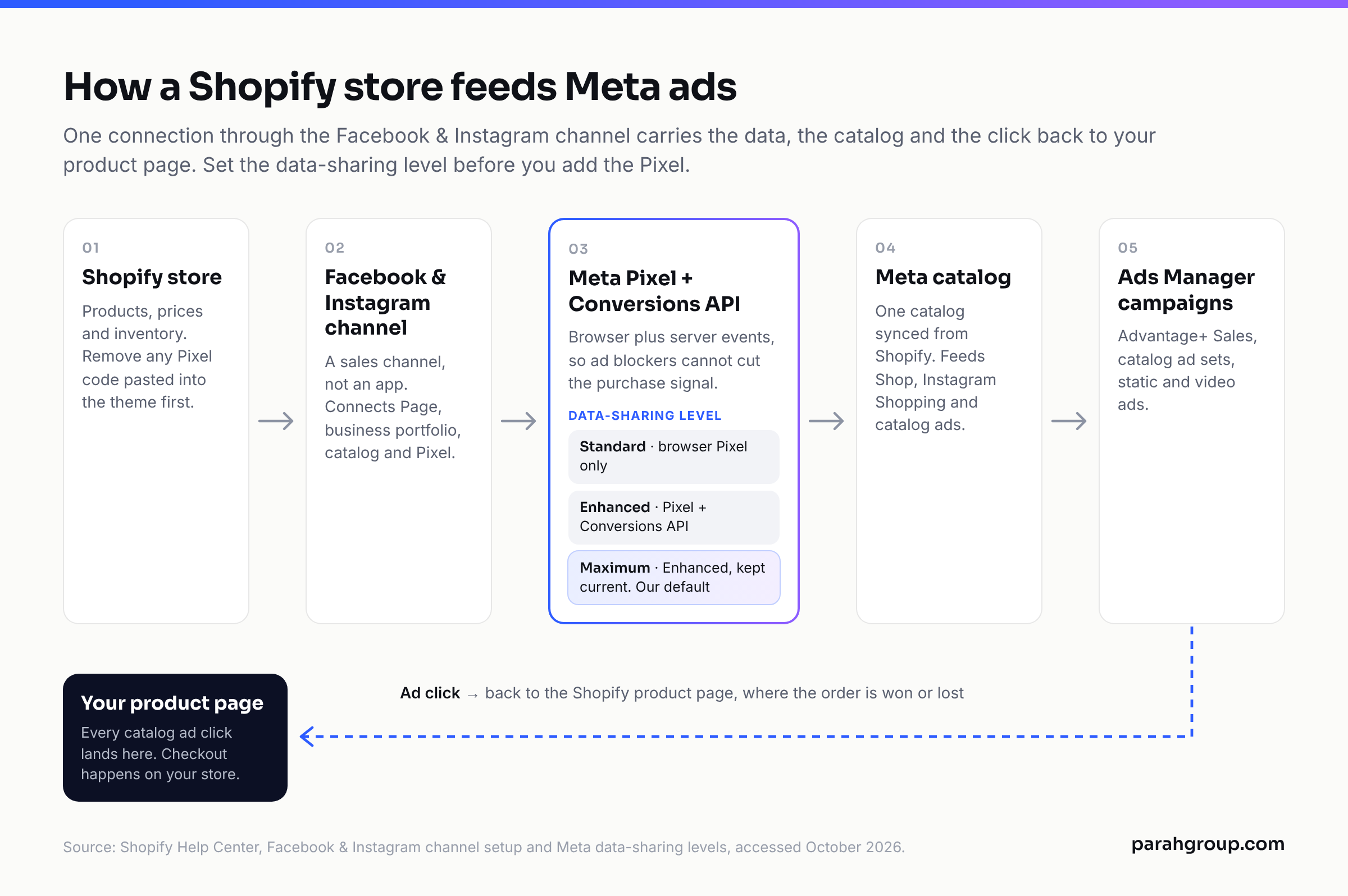
Use the Facebook & Instagram by Meta channel for almost every Shopify store. It is a sales channel, not an app, so it lives under Sales channels in the Shopify admin. Connecting it requires a Facebook account with full control of the business portfolio and the Facebook Page associated with the store, and that portfolio has to own the Page during onboarding. One connection gives you the Page, the business portfolio, a single product catalog that feeds Facebook Shop, Instagram Shopping and Facebook marketing, and the Pixel.
The decision that matters is the data-sharing level. Shopify Help Center documents three, as of October 2026:
| Data-sharing level | What is sent | How it is sent | Who should pick it |
|---|---|---|---|
| Standard | Customer browsing behavior only | Browser-based Meta Pixel | Nobody running paid at scale. A browser ad blocker can stop the Pixel sharing data. |
| Enhanced | Browsing behavior plus name, location, email address and phone number for matching | Meta Pixel plus Conversions API (server to server) | Any store spending real money. Server-side data cannot be blocked by browser ad blockers. |
| Maximum | Same as Enhanced, and the store is kept on Meta’s latest advertising technology | Meta Pixel plus Conversions API | Default choice for DTC stores. Nothing to maintain. |
Two setup rules from the Shopify Help Center that break accounts when ignored. First, you need to set a data-sharing level before you can add a Pixel; the Pixel step is inside Sales channels, Facebook & Instagram, Settings, Share data settings. Second, if a Pixel was ever pasted into theme.liquid or Online Store Preferences, remove that code before connecting through the channel. Keep both and the store fires more than one Pixel, which Shopify says produces duplicate or incorrect data and, in our experience, inflates reported purchases enough to fool a ROAS target.
When does manual Pixel plus Conversions API make sense? Three cases: a headless build where the channel cannot read the storefront, a store that needs custom events the channel does not send, or a multi-store setup that needs deduplicated events across domains. Everyone else is adding maintenance for no gain. If an agency is already managing the account, check the Pixel ID in Events Manager against the one in the channel settings before touching anything.
How do you set up the catalog and Shop so ads can use product data?
The channel creates one Meta catalog and syncs your Shopify products into it. Edit a product in Shopify and the change flows to the catalog and to the Facebook Shop section on your Page. This is the catalog that Advantage+ catalog ads (the format most people still call dynamic product ads) read from, so catalog hygiene is a paid-media task, not a merchandising task.
Three things to check before the first campaign goes live:
- Product titles and images. The catalog ad shows the first image and the title as written. A title that reads “Blue Hoodie, Medium, SKU 4471” loses the auction to a title that reads “Heavyweight Hoodie in Blue”. Fix titles in Shopify, not in Commerce Manager, so they stay in sync.
- Variants and availability. Out-of-stock variants still sync. Hide them from the catalog with a collection or product set so retargeting does not serve ads for sizes you cannot ship.
- Checkout destination. As of August 26, 2025, Shopify Help Center states that Meta is no longer the marketplace tax facilitator for new orders and that customers are redirected to the online store to complete purchases. You are responsible for collecting tax on orders from the channel, so confirm Settings, Taxes and Duties before onboarding. Practically, this means the Shopify product page is the conversion surface for every catalog ad, which raises the stakes on the PDP section later in this post.
Staff who run ads need to connect with their own Facebook accounts, or the channel shows as not connected to them. Do this on day one so the agency or media buyer is not locked out when the owner is travelling.
Advantage+ Sales or manual campaigns for a Shopify catalog?
Meta renamed Advantage+ Shopping campaigns to Advantage+ Sales campaigns in 2025, and it was more than a label change. Per Jon Loomer’s write-up of Meta’s documentation (updated March 2025), the new structure brings back ad sets with no cap on their number, adds Advantage+ Audience with audience suggestions and custom-audience exclusions, removes the Existing Customer Budget Cap, and limits each ad set to 50 ads rather than the old 150. When you create a campaign with the Sales objective, Advantage+ is on by default; narrowing age, gender or custom-audience inclusions turns it off.
For a Shopify catalog our default is a single Advantage+ Sales campaign with Advantage+ Budget on, two or three ad sets split by creative theme rather than audience, and a catalog ad set alongside static and video ad sets. We keep manual campaigns for two jobs only: a dedicated existing-customer campaign (replacing the removed budget cap) and launches where a specific audience has to see a specific offer. A separate post on this site goes deeper on Advantage+ structure; the point here is that the campaign type decision is a small lever compared with the data layer and the page. A Meta ads agency that spends its first week on campaign architecture before checking the Pixel and the PDP has the order backwards.
How much should a Shopify store budget for Facebook ads at each stage?
Budget follows the stage of the account, not the size of the ambition. Here is the floor and the working range we use, with the platform minimums sourced.
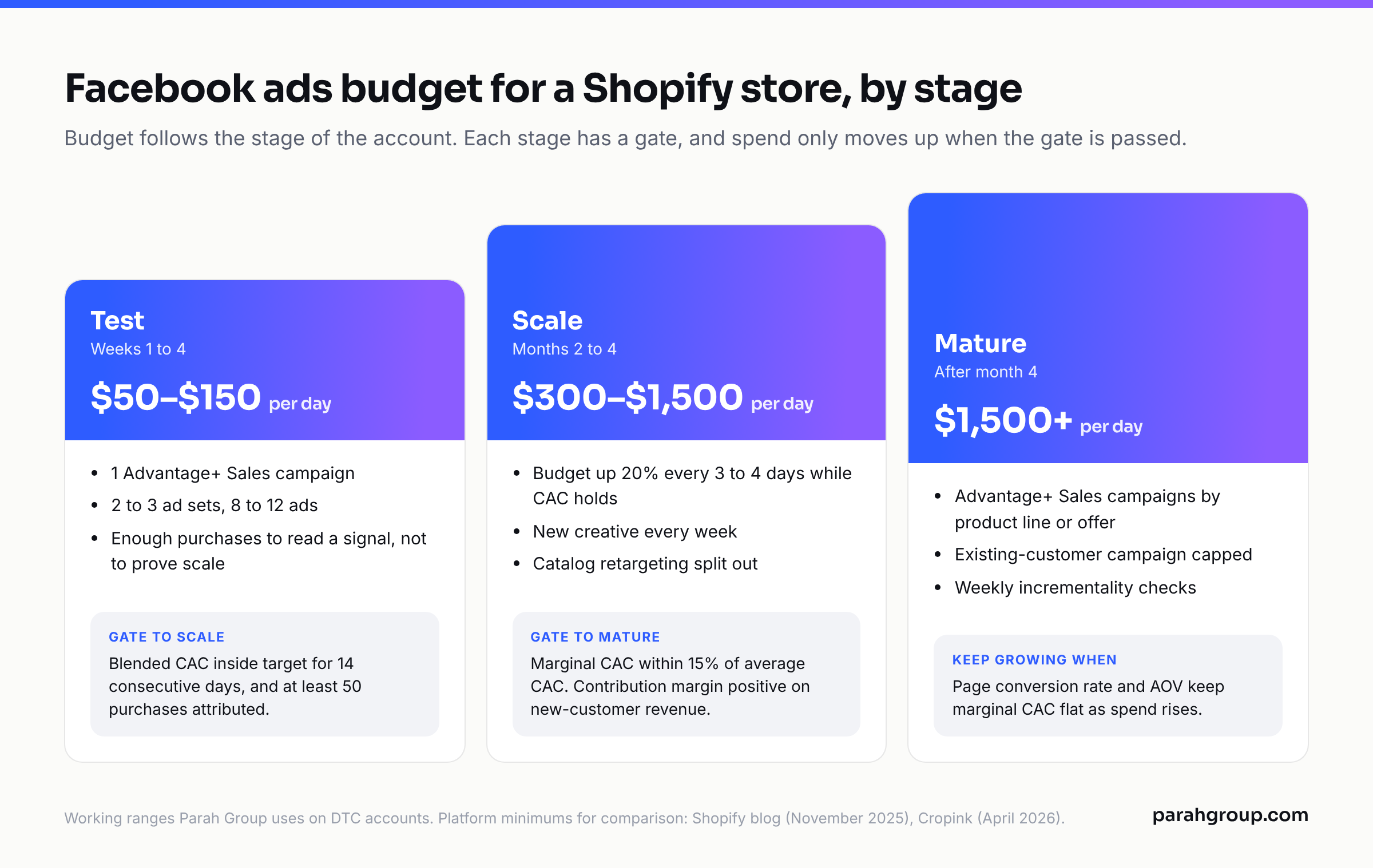
| Stage | Daily budget | What it buys | Gate to the next stage |
|---|---|---|---|
| Test (weeks 1 to 4) | $50 to $150 per day | One Advantage+ Sales campaign, 2 to 3 ad sets, 8 to 12 ads. Enough purchases per week to read a signal, not enough to prove scale. | Blended CAC inside target for 14 consecutive days and at least 50 purchases attributed. |
| Scale (months 2 to 4) | $300 to $1,500 per day | Budget raised 20% every 3 to 4 days while CAC holds. New creative every week. Catalog retargeting split out. | Marginal CAC within 15% of average CAC. Contribution margin positive on new-customer revenue. |
| Mature | $1,500 per day and up | Multiple Advantage+ Sales campaigns by product line or offer. Existing-customer campaign capped. Weekly incrementality checks. | Spend grows only when the page conversion rate and AOV keep marginal CAC flat. |
On minimums: Shopify’s own blog (updated November 2025) states the floor is $1 per day for campaigns billed by impressions and recommends at least $5 per day for traffic or sales campaigns. Cropink’s guide (updated April 2026, third-party) lists Meta’s minimum for conversion-optimized ad sets at $10 to $20 per day. Treat those as what Meta will accept, not what will produce purchases. A conversion-optimized ad set needs enough purchases per week to leave the learning phase; at a $60 CPA, a $10 per day ad set never gets there.
For context on what the auction costs, WordStream’s 2026 benchmarks (traffic campaigns, April 2025 to June 2026, third-party) put median Facebook CTR at 1.93% and CPC at $0.60 across industries, with Apparel, Fashion & Jewelry at 1.51% CTR and $0.71 CPC. Shopify’s blog cites an average CPM of about $16.06 as of November 2025. None of those numbers are your numbers; use them to sanity-check the first two weeks, then run on your own data. If you are also pricing Instagram placements, our post on Instagram ads cost per month covers the monthly ranges by store size.
If you want a second set of eyes on the budget split before you scale, we will review the ad account and the pages it lands on at no charge.
What creative formats actually convert for Shopify product pages?
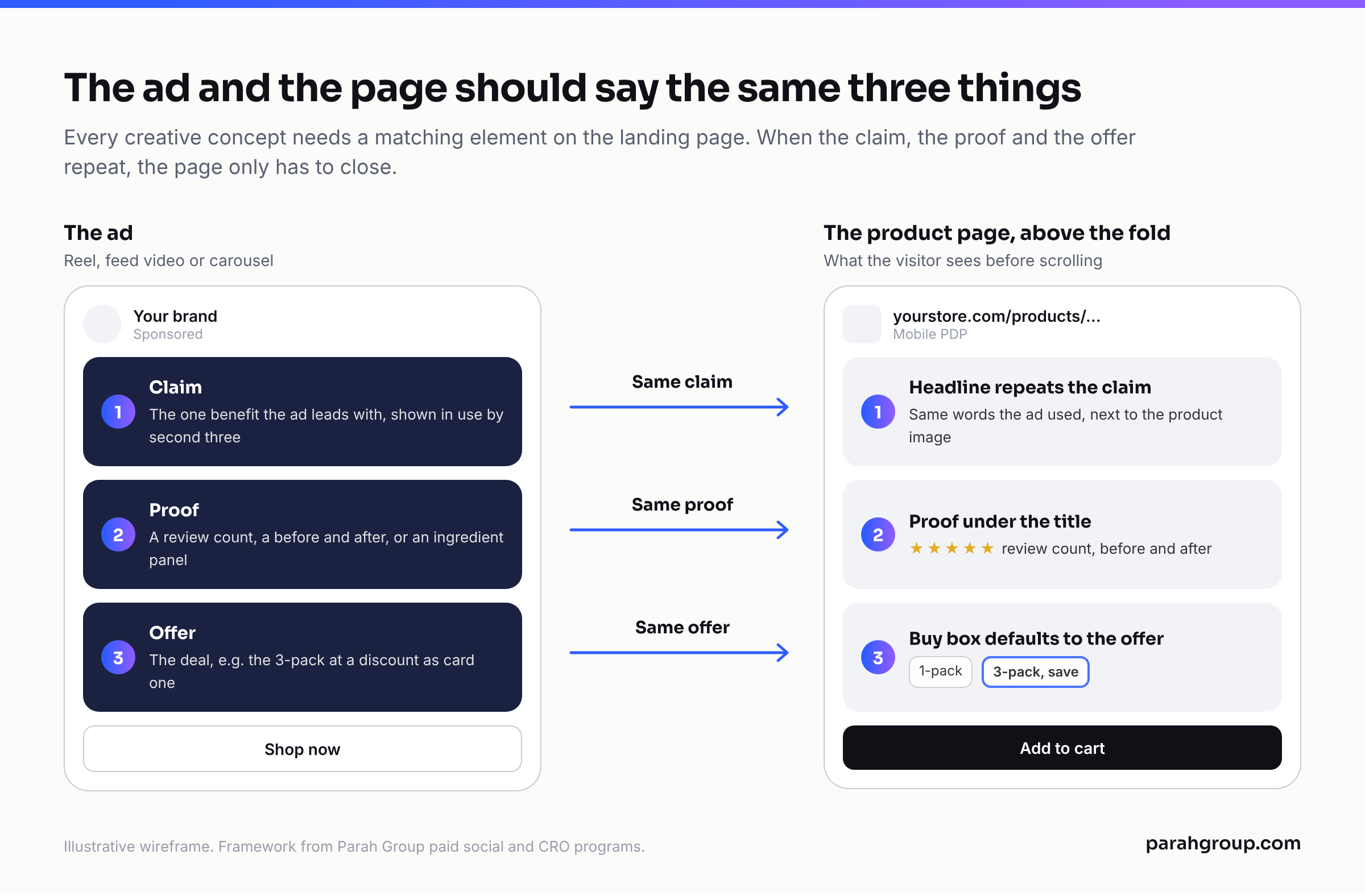
Creative is the biggest controllable input inside Ads Manager, and for Shopify stores the winning formats are the ones that pre-sell the product page. The ad should answer the first objection a visitor would raise on the PDP, so the page only has to close.
- Catalog ads with overlays. Still the highest-ROAS format for retargeting because the product the visitor viewed is the product in the ad. Add price and offer overlays from the catalog template so the ad carries the number before the click.
- UGC-style video, 15 to 30 seconds, problem first. Open on the problem, show the product in use by second three, state the offer by second ten. Works for supplements, skincare, apparel and consumables. Vertical 9:16 for Reels and Stories, 4:5 for feed; let Advantage+ placements handle the rest.
- Static comparison and “why it works” graphics. One image, one claim, one piece of proof (a review count, a before and after, an ingredient panel). These lose on CTR to video and win on conversion rate, which is why they belong in every Shopify account.
- Founder or expert talking head. Cheap to produce, and the same clip can run as a Reel and sit on the PDP as a video block.
- Offer-led carousel. Bundle or multi-pack ads that mirror the PDP buy box. If the PDP sells a 3-pack at a discount, the carousel should show the 3-pack as card one.
The practical rule: every creative concept should have a matching element on the landing page. A UGC ad about texture lands on a PDP that shows texture. A comparison ad lands on a page with the comparison table above the fold. When ad and page disagree, the click is wasted and the CPA climbs regardless of how clean the campaign structure is.
Which page-side levers change CPA more than bidding?
This is where most Shopify advertisers leave money. Meta prices the auction; you control what happens after the click. The three surfaces that move paid CPA most are the PDP buy box, the cart, and the post-purchase step, and each can be tested on Shopify without a developer using Intelligems, Shoplift, Rebuy or a similar tool.
PDP buy box
The buy box is the block with variant selector, price, quantity and the add-to-cart button. Tests that have paid off most consistently for our clients: a default to the multi-pack or subscription option with the one-time option still visible, a price-per-unit line under the multi-pack, social proof directly under the button rather than below the fold, and shipping-threshold messaging inside the box. For Momentous, a Shopify supplements brand, one shipping-threshold test added $2M in profit, and their subscription take rate rose 10%. The test ran on the page, not in Ads Manager, and it changed the economics of every paid dollar.
Cart
Cart is where AOV is made or lost. A gamified progress bar toward free shipping or a free gift, a cart-level upsell of a complementary product, and a hard cap on distraction (no coupon field hunting) are the defaults. On Willie’s, a cannabis DTC store, we ran Intelligems checkout tests, a Rebuy post-purchase flow and a gamified cart bar while paid traffic scaled; in three months conversion rose 20%, AOV rose 25% and subscription take rate rose 75%. We have seen the same pattern across supplements and apparel: the ad account did not change much, the page did, and CAC dropped as a result.
Post-purchase
Post-purchase upsells on Shopify are one-click offers shown after payment and before the thank-you page. They carry zero risk to conversion rate because the order is already placed, which makes them the safest AOV lever a paid program has. A 10% lift in AOV from post-purchase alone turns a break-even campaign into a profitable one at the same CPA. This is why Parah runs paid social and the landing-page side as a single paid social + CRO program; a Shopify CRO engagement without a paid feed is testing on traffic that is not buying, and a paid engagement without page work is paying full price for every improvement.
How do you know the setup is working after the first 30 days?
Four checks, in order. First, Events Manager shows Purchase events arriving from both browser and server with an event match quality score above 6 and a deduplication rate that is not zero; if server events are missing, the data-sharing level was set to Standard. Second, Shopify’s order count and Meta’s attributed purchases in the same window are within a sensible gap. Meta will claim more than it caused; a gap over 40% usually means a duplicate Pixel or a retargeting campaign eating organic. Third, the catalog shows no disapproved products and no out-of-stock items in the retargeting product set. Fourth, your weekly report tracks blended CAC, AOV, contribution margin and new-customer revenue rather than ROAS alone, because ROAS hides the AOV lift that page work delivers.
If those four hold, raise budget on the scale schedule in the table above. If any fail, fix the data or the page before adding spend. Agencies price this work in very different ways; our post on Facebook ads agency pricing explains the models and what each one should include. Get a free, no-obligation audit of your ad accounts and the Shopify pages they land on here.
Frequently asked questions
Do I need the Conversions API for Facebook ads on Shopify?
Yes, if you are optimizing for purchases. Shopify sends Conversions API data when the Facebook & Instagram channel’s data-sharing level is set to Enhanced or Maximum. Standard sends browser Pixel data only, which ad blockers can stop. Server-side events keep purchase signal flowing to Meta’s optimization, which is what the bid is built on.
Should I install the Meta Pixel manually on my Shopify theme?
No, unless you have a headless storefront or custom events the channel cannot send. Shopify Help Center instructs you to remove any Pixel code from theme.liquid or Online Store Preferences before connecting through the channel. Running both creates a second Pixel, duplicate purchase events and inflated attribution in Ads Manager.
How much should a new Shopify store spend on Facebook ads per day?
Plan on $50 to $150 per day during the first month if you want a readable signal within four weeks. Meta accepts far less, around $1 per day for impression-billed campaigns and $10 to $20 for conversion-optimized ad sets per third-party guides, but a conversion ad set needs enough weekly purchases to leave learning, and $10 a day rarely gets there.
What is the difference between Advantage+ Shopping and Advantage+ Sales campaigns?
Advantage+ Sales is the 2025 replacement for Advantage+ Shopping. The new version restores ad sets with no limit on their number, includes Advantage+ Audience with suggestions and custom-audience exclusions, removes the Existing Customer Budget Cap and caps each ad set at 50 ads. It is on by default for the Sales objective; adding hard targeting switches it off.
Why are my Facebook ads driving Shopify traffic but not sales?
Usually the page, not the ad. Check that the ad’s claim, proof and offer appear on the PDP above the fold, that the buy box defaults to the offer in the ad, and that the cart does not distract. Then verify the Pixel is not duplicated and that Purchase events are arriving server-side so Meta optimizes toward buyers, not clickers.
Can customers still check out on Facebook or Instagram from a Shopify store?
As of August 26, 2025, Shopify Help Center states that Meta is no longer the marketplace tax facilitator for new orders and that customers are redirected to the online store to complete purchases. Your Shopify product page and checkout are the conversion surface for every catalog and Shop ad, and you are responsible for collecting tax on those orders.
Sources
- Shopify Help Center: Setting up the Facebook & Instagram channel (accessed October 2026)
- Shopify Help Center: Facebook data sharing levels (Standard, Enhanced, Maximum) (accessed October 2026)
- Shopify Help Center: Setting up the Meta pixel (accessed October 2026)
- Shopify Help Center: Facebook Shop (accessed October 2026)
- Jon Loomer: Advantage+ Sales replaces Advantage+ Shopping (updated March 2025, third-party)
- Jon Loomer: Advantage+ Sales, App and Leads campaigns (updated March 2025, third-party)
- WordStream: Facebook Ads Benchmarks 2026 (data April 2025 to June 2026, third-party)
- Shopify blog: How much do Facebook ads cost (updated November 2025, third-party benchmark)
- Cropink: Minimum budget for Facebook ads (updated April 2026, third-party)