A Facebook ads audit is a structured review of a Meta ad account against a fixed checklist: tracking, attribution, structure, budget, creative, audience, offer, and the pages the ads land on. Most audits stop at Ads Manager. Ours goes to the landing page, the cart, and the post-purchase flow, because that is where paid-social CPA is usually won or lost.
Below is the 25-point checklist we run on every account before we touch a budget. It is the same one we use on our own free audits. Use it as a Facebook ads audit template for your own account, or hand it to whoever runs your Meta ads and ask them to score it.
What does a Facebook ads audit actually check?
It checks whether the account can be trusted, whether it is structured to spend efficiently, whether the creative is doing the selling, and whether the site converts the traffic the ads buy. Four of those five areas live in Ads Manager and Events Manager. The fifth lives on your store, and it is the one most Facebook ads audit checklists skip.
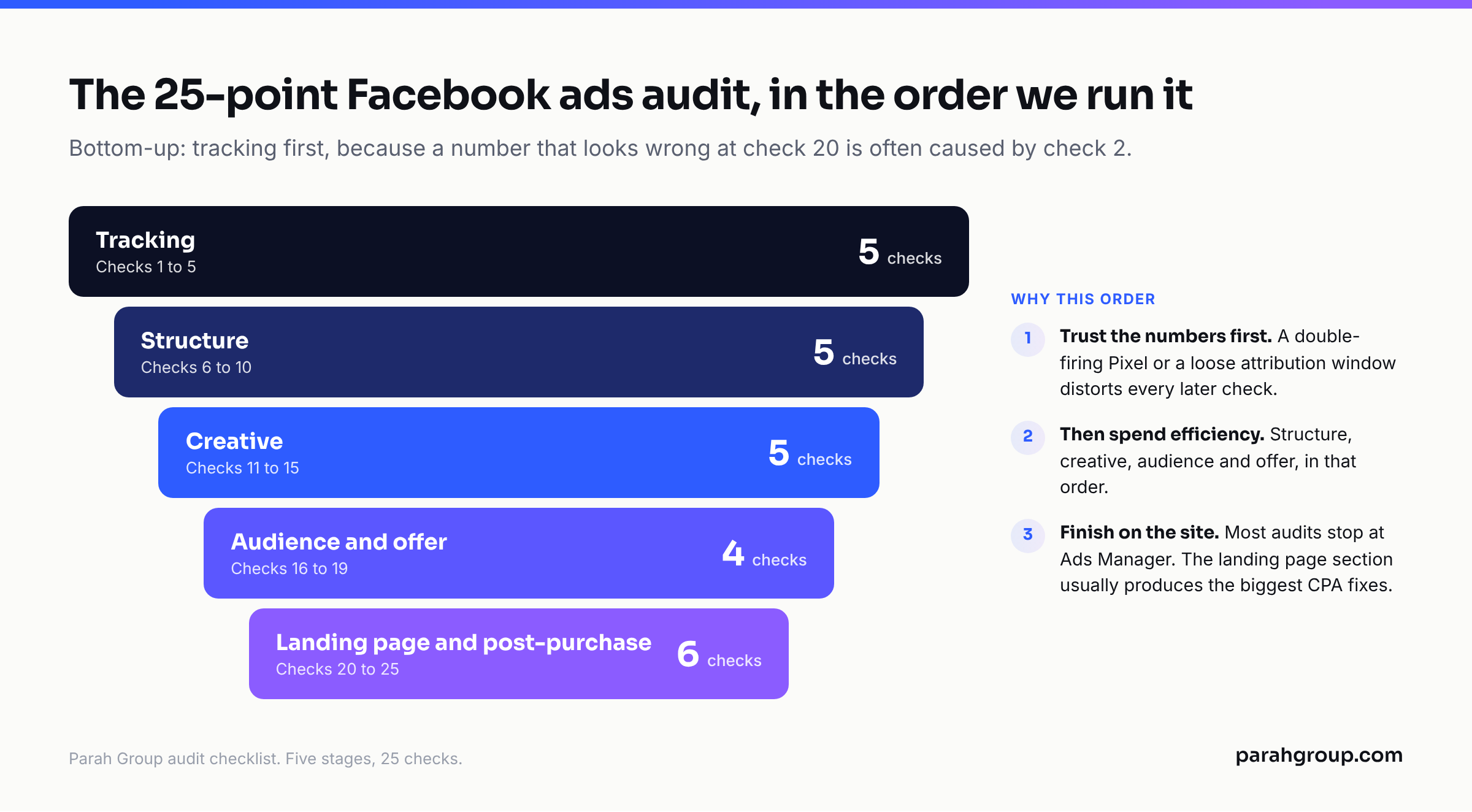
The order matters. There is no point rating creative if the Pixel double-fires purchases and the attribution window is inflating results. So we audit from the bottom up: tracking first, then structure, then creative, then audience and offer, then the landing page and everything after the click. A number that looks wrong at step 20 is often caused by something at step 2.
We also keep the audit short. Twenty-five checks is enough to find the two or three things that move CPA in the next 30 days. A 90-point audit produces a 40-page document nobody acts on. A 25-point one produces a prioritised fix list, which is the only output that matters.
Below, each check has three columns: what we are checking, what good looks like, and where to find it. The “where” column is the part that makes it usable as a template. If you cannot find the number, you cannot audit it.
Is my tracking good enough to trust the numbers?
Start here, because every other check depends on it. Meta’s own documentation scores each server event on Event Match Quality, a score out of 10 that “indicates how effective your server event’s customer information may be” at matching to a Meta account, and it is blunt about why it matters: “only matched events can be used for ads attribution and ad delivery optimization.” Meta recommends sending email, phone, first and last name, client IP address, and an external_id with every event, and running the Pixel and the Conversions API together on the same event names with a shared event_id so purchases are deduplicated rather than double-counted (Meta for Developers, Conversions API best practices, as of October 2026).
Attribution is the second trap. The default reporting window is 7-day click and 1-day view. For a DTC store running retargeting, 1-day view can credit purchases from people who were coming back anyway. Ads Manager has a Compare Attribution Settings option under the Columns menu that adds 1-day click, 7-day click, 28-day click and view columns side by side; Jon Loomer’s walkthrough of it (updated April 2026) makes the case that “click conversions more accurately reflect the impact of your ads than view-through.” We run that comparison on every audit. If 7-day click purchases are 40% below the default view, the account’s ROAS is a reporting artefact, and every scaling decision made on it was made on bad data.
| # | Check | What good looks like | Where to find it |
|---|---|---|---|
| 1 | Pixel and Conversions API both firing | Same event names from browser and server, deduplicated via event_id | Events Manager > Data Sources > Overview, “Connection method” column |
| 2 | Event Match Quality on Purchase | Email, phone, name, IP and external_id sent; score trending up month on month, not down | Events Manager > Data Sources > event row > Event Match Quality |
| 3 | Purchase value and currency passed | Order value matches Shopify to within 2 to 3% over a week | Events Manager > Test Events; Ads Manager Purchase Conversion Value vs store orders |
| 4 | Attribution setting checked against clicks | Default 7-day click, 1-day view compared to 7-day click only; gap understood and documented | Ads Manager > Columns > Compare Attribution Settings |
| 5 | Audience exclusions in place | Purchasers (30 to 180 days) excluded from prospecting; prospecting and retargeting do not overlap | Ad set > Audience > Exclude; Audiences > Audience Overlap tool |
One more tracking note. If the account runs Advantage+ Sales campaigns (Meta renamed Advantage+ Shopping Campaigns to Advantage+ Sales in 2025 and merged them into the standard Sales objective), check 5 changes. Advantage+ Sales now accepts custom audience exclusions, which the old Advantage+ Shopping format did not; Jon Loomer’s write-up of the change (updated March 2025) calls the lack of exclusion control “a major complaint” about the old format. If an account migrated and nobody added exclusions back, it is paying prospecting CPMs to reach its own customers.
Is the account structured to exit learning and spend efficiently?
Structure is where most accounts leak. The usual pattern: fifteen ad sets, each with $30 a day, each permanently in Learning Limited, each with three ads nobody has looked at since launch. Meta’s rule of thumb, restated in ppc.land’s documentation summary (September 2026), is that “an ad set generally needs about 50 optimisation events within seven days of its last significant edit to exit learning,” and that changes to targeting, placements, the optimisation event, bid strategy, adding a new ad, or large budget changes all count as significant edits that restart it. Fifteen ad sets at $30 a day on a $60 product will never see 50 purchases in a week each. One or two consolidated ad sets might.
So we count ad sets, count the ones flagged Learning Limited, and divide weekly spend by weekly purchases per ad set. Then we look at the edit history. An account where someone changes budgets by 40% every other day is an account that has never left learning, and its CPA is the CPA of the learning phase, not the CPA of the campaign.
Frequency and reach are the other half. On a prospecting campaign, frequency climbing past 3 in a 7-day window while CTR falls is the earliest reliable fatigue signal, and it shows up in the breakdown a week before CPA does.
| # | Check | What good looks like | Where to find it |
|---|---|---|---|
| 6 | Ad set count vs budget | Few enough ad sets that each can reach roughly 50 optimisation events a week; Advantage+ budget on where it makes sense | Ads Manager > Ad sets tab, Delivery column, Amount Spent |
| 7 | Learning Limited status | Under 20% of active spend in Learning Limited ad sets | Ad sets tab > Delivery column; filter Delivery = Learning Limited |
| 8 | Edit frequency | No significant edits (budget over 20%, targeting, optimisation event) more than once every 7 days per ad set | Campaign > View History (clock icon) |
| 9 | Prospecting vs retargeting split | Spend split written down and intentional; retargeting judged on 7-day click, not 1-day view | Campaign naming plus Compare Attribution Settings |
| 10 | Frequency and reach trend | 7-day frequency under 3 on prospecting with CTR flat; reach still growing week on week | Columns > Customize > Frequency, Reach; Breakdown by week |
Is the creative doing the selling or just filling the slot?
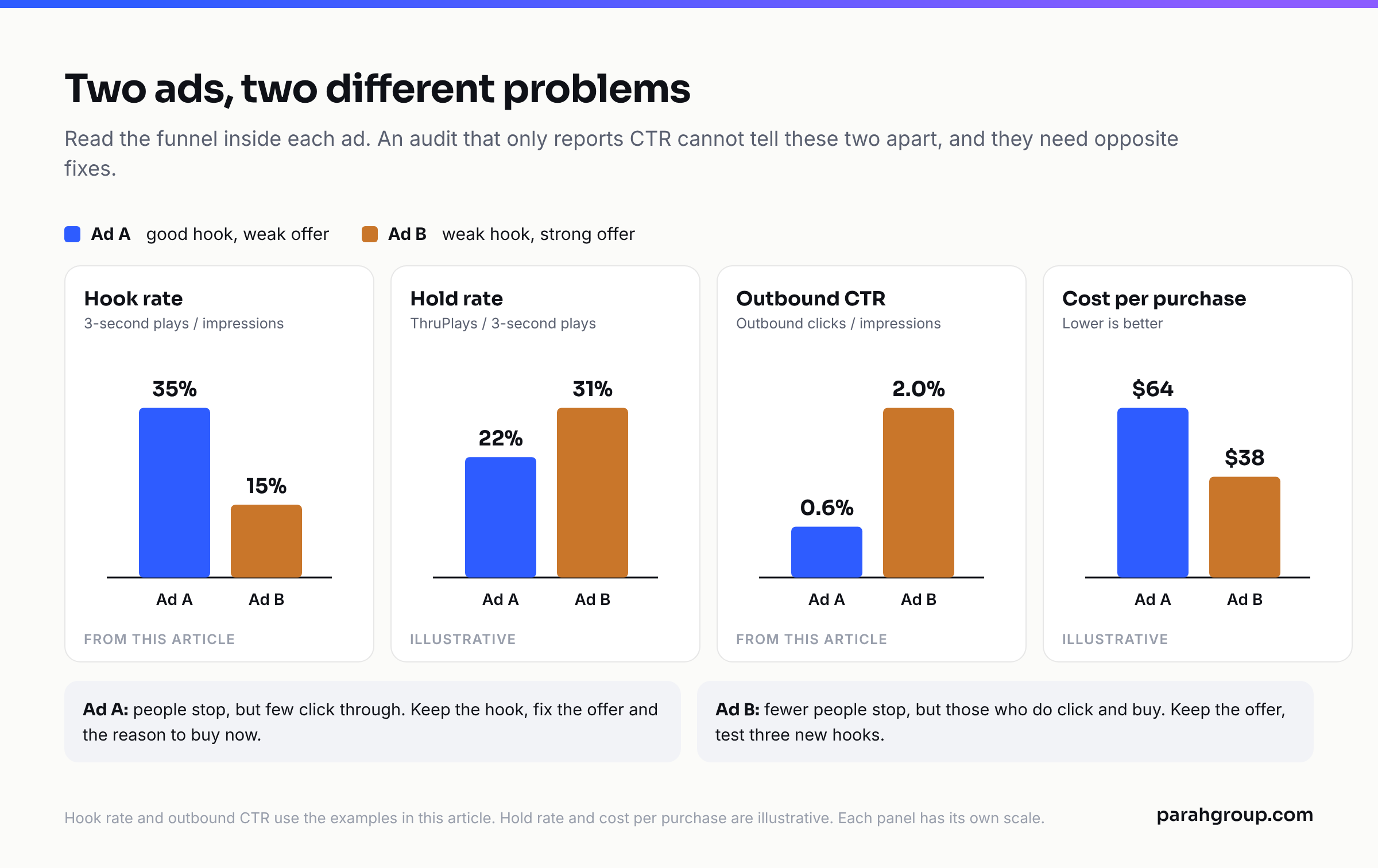
Meta buys attention on creative, and its delivery system rewards the ads people stop for. We audit creative by reading the funnel inside the ad: how many people stopped (hook rate, 3-second video plays divided by impressions), how many stayed (ThruPlay or 15-second rate), how many clicked (outbound CTR, not link CTR), and what each of those cost. An ad with a 35% hook rate and a 0.6% outbound CTR has a good hook and a bad offer. An ad with a 15% hook rate and a 2% CTR has the opposite problem. Both get fixed differently, and an audit that only reports CTR cannot tell them apart.
Format mix is the second creative check. An account running only static product images, or only one editor’s style of UGC video, has no diversity for the delivery system to allocate across. We want statics, short UGC, a founder or expert piece, and at least one long-form explainer in rotation. And we want to know how many net-new concepts shipped in the last 30 days. Winning accounts we work with ship four to eight. Stalled accounts ship one, usually a resize of the last winner.
For third-party context, WordStream’s most recent published Facebook benchmarks (data from February 2023 to April 2024, page updated September 2026) put median CTR at 1.57% for traffic campaigns and 2.53% for leads campaigns, with median CPC at $0.77 and $1.88 respectively. Treat these as context, not targets; DTC purchase campaigns behave differently from the blended set. The number that matters is your own account’s CTR last quarter against this quarter.
| # | Check | What good looks like | Where to find it |
|---|---|---|---|
| 11 | Hook rate on video | 3-second plays divided by impressions reported per ad; top ads clearly above account median | Columns > Customize > 3-Second Video Plays, Impressions; create custom metric |
| 12 | Hold rate | ThruPlay or 15-second plays divided by 3-second plays tracked; drop-off point known | Columns > Customize > ThruPlays, Video Plays at 25/50/75% |
| 13 | Outbound CTR by ad | Outbound CTR (not link CTR) used for decisions; bottom third of ads paused monthly | Columns > Customize > Outbound CTR (Click-Through Rate) |
| 14 | Format and concept mix | Static, UGC, founder or expert, and long-form all live; 4 or more net-new concepts in the last 30 days | Ads tab, Breakdown by Creative Asset or Ad; Account Overview > Ads launched |
| 15 | Fatigue signals per ad | Ads with rising frequency plus falling CTR plus rising CPA flagged and refreshed within a week | Ads tab > Breakdown > Time > Week; compare Frequency, CTR, Cost per Purchase |
Are the audience and the offer matched to the stage of the funnel?
Audience checks are shorter than they were. With Advantage+ audience and broad targeting doing most of the work, the audit is less about interest stacks and more about three things: whether the account has strong first-party signals for Meta to learn from (a Purchase event with high match quality feeds this directly, which is why tracking comes first), whether exclusions are in place so the system is not learning from existing customers, and whether retargeting pools are sized to the spend behind them. A retargeting ad set with a 7-day site visitor pool of 4,000 people and a $200 daily budget will hit a frequency of 8 inside a week. That is not retargeting. That is harassment, and it inflates view-through conversions.
Offer is where we spend more time. The same product with a different offer can halve CPA, and offers are the cheapest thing to test. We check what the ad promises against what the page delivers (free shipping threshold, bundle discount, first-order code, subscription discount), whether the offer has been tested at all in the last quarter, and whether there is any offer at all for a cold visitor who has never heard of the brand. “Shop now” with no reason to shop now is the most common finding in this section.
If you want us to run this section on your account with you on the call, the free audit on our Meta ads agency page covers it.
| # | Check | What good looks like | Where to find it |
|---|---|---|---|
| 16 | Prospecting targeting approach | Broad or Advantage+ audience with purchaser exclusions; interest stacks only where they beat broad on 7-day click CPA | Ad set > Audience; compare ad sets by Cost per Purchase (7-day click) |
| 17 | Retargeting pool size vs budget | Daily budget sized so 7-day frequency stays under 4 to 5 on warm audiences | Audiences > audience size; Ad set > Frequency |
| 18 | Offer present and matched | Cold traffic has a stated reason to buy now; ad offer identical to page offer | Ad preview vs landing page; Shopify Discounts |
| 19 | Offer tested in last 90 days | At least one structured offer test (threshold, bundle, discount, gift) with a recorded result | Intelligems, Shoplift or VWO test log; campaign naming |
Why do most Meta ads audits stop before the landing page?
Because the person doing the audit is usually paid on media, not on conversion, and the landing page is someone else’s department. That split is the single biggest reason paid-social accounts stall. The ad can be perfect, and if the page it lands on takes four seconds to render on a phone, says something different from the ad, and has a buy box that hides the subscription option below the fold, the CPA is the page’s fault and no amount of Ads Manager work will fix it.
We run the landing page and post-purchase checks as part of the same audit because we run paid social and CRO as one program, and the results come from the page side as often as the ad side. On Binoid, a hemp and CBD store, I watched paid-social CPA drop 30% in four months and the ad account barely changed; the work was a landing page program that shipped multiple pages a month testing angles and products, plus offer tests. On Optimize Minerals, paid landing pages converted 40% better than the pages the ads had been sent to before, and post-purchase upsells added about 10% to AOV. Neither result shows up in a Facebook ads audit that stops at Ads Manager.
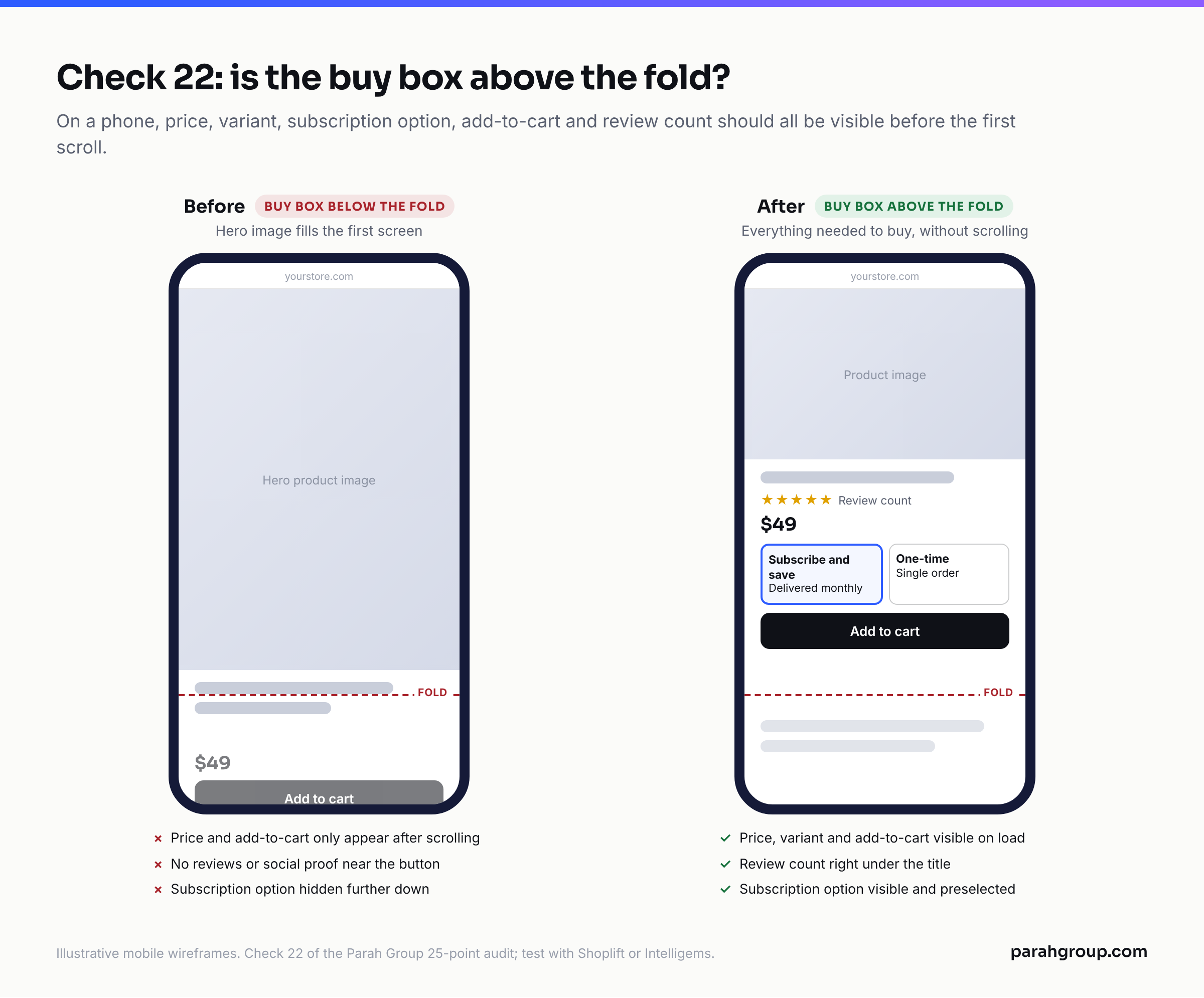
The checks themselves are concrete. Speed on a mid-range Android, not a laptop. Message match: the headline on the page repeats the promise in the ad. The PDP buy box: price, variant, subscription option, add-to-cart and the main social proof all visible without scrolling. Cart: a progress bar toward a threshold, one upsell, no coupon-code field inviting people to leave and search for a discount. Post-purchase: one upsell offer after payment, before the thank-you page. Each of these is a line in the table, and each one has a tool we use to test it: Intelligems or VWO for the page, Rebuy for the cart and post-purchase.
| # | Check | What good looks like | Where to find it |
|---|---|---|---|
| 20 | Mobile page speed | Largest Contentful Paint under 2.5 seconds on mobile for the top three paid landing URLs | PageSpeed Insights on the exact URL in the ad, mobile tab |
| 21 | Message match | Page headline and hero image restate the ad’s promise and offer; same product, same price | Ad preview next to the live URL, on a phone |
| 22 | PDP buy box above the fold | Price, variant, subscription option, add-to-cart and review count all visible without scrolling | Shopify theme preview on mobile; Shoplift or Intelligems test history |
| 23 | Cart and threshold mechanics | Progress bar to free shipping or free gift; one cart upsell; no open coupon field on paid traffic | Rebuy cart settings; Shopify checkout settings |
| 24 | Post-purchase upsell live | One-click upsell after payment with a take rate tracked; AOV lift measured against control | Rebuy or Shopify post-purchase app; Shopify Analytics > AOV |
| 25 | Paid landing page vs PDP test | A dedicated paid landing page tested against the default PDP for each top product in the last quarter | Intelligems or VWO experiment log; Ads Manager by Destination URL |
How do you turn 25 checks into a plan that moves CPA?
Score every line pass or fail, then rank the fails by two things: how much spend they touch and how fast they can be fixed. A deduplication bug on the Purchase event touches 100% of spend and takes a developer an afternoon. That goes first. A creative refresh touches 100% of spend but takes two weeks to produce. That goes second, and starts the same day. A retargeting frequency problem touches 15% of spend and takes ten minutes. That gets fixed on the call.
The output we hand over is a one-page fix list with an owner and a week against each item, never the 25-row table on its own. The table is the method. The list is the deliverable. Usually it has five to seven items on it, three of which are on the site rather than in the ad account, which is why the audit has to include the site in the first place.
If you are deciding whether to run this yourself or bring in a paid social + CRO program, the honest test is section five. If nobody on your team owns the landing page, cart and post-purchase checks, the ad-side fixes will get done and the CPA will move a little. If someone owns all 25, it moves a lot. Our landing page program exists because that second owner is usually missing. What that costs is covered in our post on Facebook ads agency pricing, and the Shopify-side version of this audit is in our guide to auditing your Shopify funnel for conversion leaks.
Or skip the self-scoring. We run this exact 25-point audit on your Meta account and the pages it lands on, free and with no obligation, and send back the fix list ranked by spend touched. Get a free, no-obligation audit of your ad accounts. Bring Ads Manager access and your top three landing URLs and we will come back with the five things to fix first.
Frequently asked questions
How often should you audit a Facebook ad account?
Run the full 25-point audit when you take over an account, and again every quarter. Run the tracking and structure sections (checks 1 to 10) monthly, because Pixel breakages and learning-phase resets happen quietly and cost spend every day they go unnoticed. Creative and landing page checks are continuous work, not a quarterly event.
What is a good Event Match Quality score for the Purchase event?
Meta’s documentation does not publish a target; it scores each event out of 10 and says the higher the better, because only matched events can be used for attribution and delivery optimisation. In practice, send email, phone, name, IP and an external_id on every Purchase event, run Pixel and Conversions API together with a shared event_id, and watch for the score moving up, not down, after any site change.
How many conversions does an ad set need to exit the learning phase?
Meta’s long-standing guideline is about 50 optimisation events within seven days of the last significant edit. Significant edits include changes to targeting, placements, the optimisation event, bid strategy, adding a new ad, or large budget changes. An ad set that cannot reach that number is flagged Learning Limited, which is usually a sign to consolidate rather than to keep tweaking.
Is a Meta ads audit the same as a Facebook ads audit?
Yes. Meta is the company; Facebook and Instagram are the placements, and both run from the same Ads Manager and the same Pixel. A Meta ads audit covers the whole account, including Instagram, Reels, Messenger and Audience Network placements, and the checklist above applies to all of them. Pay attention to placement breakdowns on the creative checks, since a hook that works on Reels can fail in Feed.
Can I use this Facebook ads audit checklist as a template for my own account?
That is the intent. Copy the five tables into a sheet, add a pass or fail column and a notes column, and work top to bottom. The “where to find it” column tells you which Ads Manager view or tool to open. Expect it to take two to three hours the first time, and expect the landing page section to produce the fixes with the biggest CPA impact.
What should a free Facebook ads audit from an agency include?
At minimum, a written fix list with each item tied to a specific metric and a specific place in the account, not a generic deck. It should cover tracking and attribution first, since those decide whether any other number can be trusted, and it should look at the landing page and post-purchase flow, because an audit that ends at Ads Manager misses the half of CPA that lives on your site.
Sources
- Meta for Developers, Conversions API best practices (Event Match Quality, customer information parameters, redundant Pixel + CAPI setup), as of October 2026
- PPC Land, Learning phase (50 optimisation events in seven days; significant edits that restart learning), September 2026
- Jon Loomer, Compare Attribution Settings in Ads Manager, updated April 2026
- Jon Loomer, Advantage+ Sales replaces Advantage+ Shopping, updated March 2025
- Jon Loomer, Attribution Setting (default 7-day click, 1-day view), updated November 2023
- WordStream, Facebook Ads Benchmarks (third-party; data February 2023 to April 2024, page updated September 2026)